
Peripherals
VisionFive 2 Lite has the following peripherals.
- GPIO Interface
- Camera Interface
- Display Interface
- USB Host
- HDMI
- M.2 Connector
- Gigabit Ethernet Port
- PoE Header
- Fastboot Header
- Boot Button
GPIO Interface
- 3.3 V (on 2 pins)
- 5 V (on 2 pins)
- Ground (on 8 pins)
- GPIO
- CAN bus
- DMIC
- I2C
- I2S
- PWM
- SPI
- UART
The following table describes the GPIO pin assignments:
| Pin Name | Pin Num | Pin Num | Pin Name |
|---|---|---|---|
| +3.3V | 1 | 2 | +5V |
| GPIO58 (I2C SDA) | 3 | 4 | +5V |
| GPIO57 (I2C SCL) | 5 | 6 | GND |
| GPIO55 | 7 | 8 | GPIO5 (UART TX) |
| GND | 9 | 10 | GPIO6 (UART RX) |
| GPIO42 | 11 | 12 | GPIO38 |
| GPIO43 | 13 | 14 | GND |
| GPIO47 | 15 | 16 | GPIO54 |
| +3.3V | 17 | 18 | GPIO51 |
| GPIO52 (SPI MOSI) | 19 | 20 | GND |
| GPIO53 (SPI MISO) | 21 | 22 | GPIO50 |
| GPIO48 (SPI SCLK) | 23 | 24 | GPIO49 (SPI CE0) |
| GND | 25 | 26 | GPIO56 |
| GPIO45 | 27 | 28 | GPIO40 |
| GPIO37 | 29 | 30 | GND |
| GPIO39 | 31 | 32 | GPIO46 (PWM0) |
| GPIO59 (PWM1) | 33 | 34 | GND |
| GPIO63 | 35 | 36 | GPIO36 |
| GPIO60 | 37 | 38 | GPIO61 |
| GND | 39 | 40 | GPIO44 |
GPIO Alternative Functions
All GPIOs can be switched (multiplexed) to support different functions including but not limited to SDIO, Audio, DMIC, SPI, I2C, UART, PWM, and CAN bus. For detailed instructions, refer to the VisionFive 2 40-Pin GPIO Header User Guide. The alternate peripheral functions are described in the JH7110 Datasheet.
Camera Interface
VisionFive 2 Lite has 1× 2-lane MIPI CSI camera port, supporting up to 1080p@30fps.
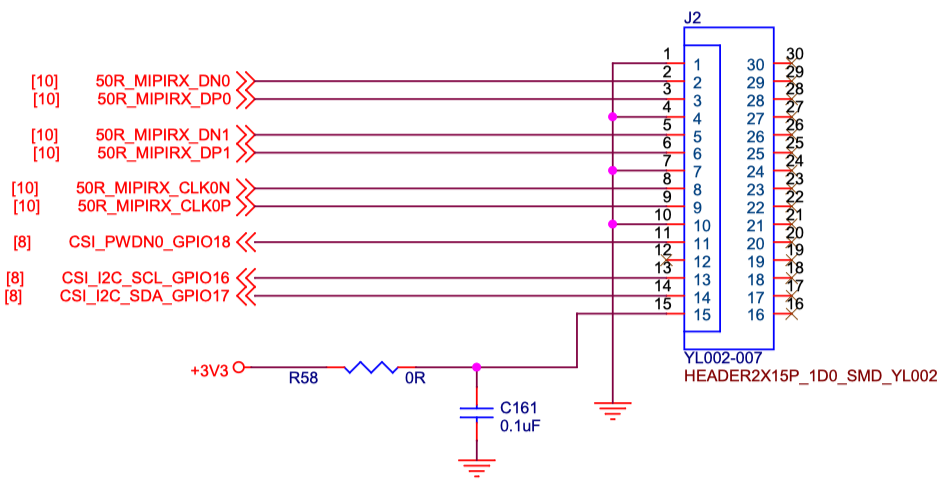
| No. | Definition | Description | Voltage |
|---|---|---|---|
| 1 | GND | Ground | - |
| 2 | 50R_MIPIRX_DN0 | MIPI Input Lane 0 Negative | 1.8V |
| 3 | 50R_MIPIRX_DP0 | MIPI Input Lane 0 Positive | 1.8V |
| 4 | GND | Ground | - |
| 5 | 50R_MIPIRX_ DN1 | MIPI Input Lane 1 Negative | 1.8V |
| 6 | 50R_MIPIRX_ DP1 | MIPI Input Lane 1 Positive | 1.8V |
| 7 | GND | Ground | - |
| 8 | 50R_MIPIRX_CLK0N | MIPI Input Clock 0 Negative | 1.8V |
| 9 | 50R_MIPIRX_CLK0P | MIPI Input Clock 0 Positive | 1.8V |
| 10 | GND | Ground | - |
| 11 | CSI_PWDN0_GPIO18 | CSI power control | 3.3V |
| 12 | NC | NC | - |
| 13 | CSI_I2C_SCL_GPIO16 | CSII2C SCL | 3.3V |
| 14 | CSI_I2C_SDA_GPIO17 | CSII2C SDA | 3.3V |
| 15 | +3.3 V | Power Voltage for digital circuit 3.3 V | 3.3V |
Display Interface
- 1× 2-lane MIPI DSI display port, supporting up to 1080p@30fps
- 1× HDMI 2.0, supporting up to 4K@30fps or 2K@60fps
The following figure and table describe the 2-lane MIPI DSI definition:
Figure 2. 2-Lane MIPI DSI Pin Definition 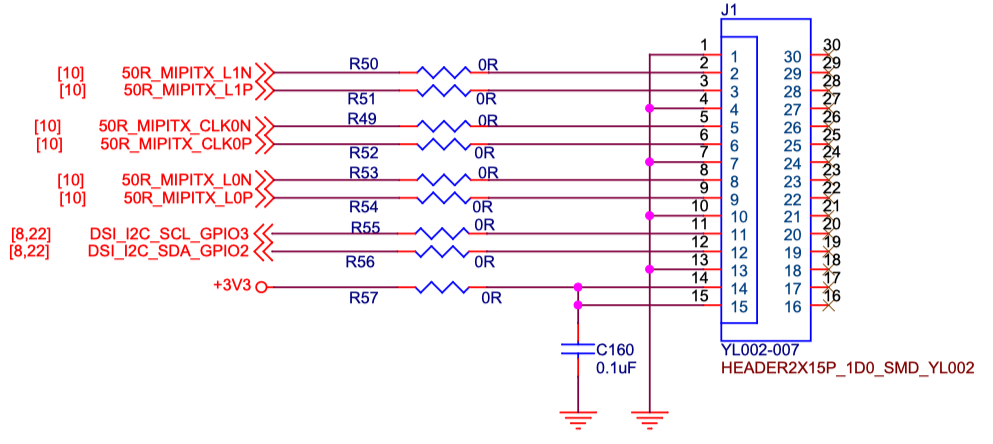
Table 3. 2-Lane MIPI DSI Pin Definition PIN NO. Pin Definition Description Voltage 1 GND Ground - 2 50R_MIPITX_L1N MIPI Output Lane 1 Negative 1.8V 3 50R_MIPITX_L1P MIPI Output Lane 1 Positive 1.8V 4 GND Ground - 5 50R_MIPITX_CLK0N MIPI Output Clock 0 Negative 1.8V 6 50R_MIPITX_CLK0P MIPI Output Clock 0 Positive 1.8V 7 GND Ground - 8 50R_MIPITX_L0N MIPI Output Lane 0 Negative 1.8V 9 50R_MIPITX_L0P MIPI Output Lane 0 Positive 1.8V 10 GND Ground - 11 DSI_I2C_SCL_GPIO3 DSII2C SCL 3.3V 12 DSI_I2C_SDA_GPIO2 DSII2C SDA 3.3V 13 GND Ground - 14 +3.3V Power Voltage for digital circuit 3.3 V 3.3V 15 +3.3V Power Voltage for digital circuit 3.3 V 3.3V
USB Host
3× USB 2.0 and 1× USB 3.0/USB 2.0 ports (multiplexed with a PCIe 2.0 1× lane).
USB Device Port
1× USB device port by reusing the USB-C port.
HDMI
1× HDMI 2.0, supporting up to 4K@30fps or 2K@60fps.
M.2 Connector
M.2 M-Key SSD socket with 1× PCIe 2.0 interface, providing high speed storage access.
Gigabit Ethernet Port
1× RJ45 Gigabit Ethernet port.
PoE Header
VisionFive 2 Lite provides Power over Ethernet (PoE) function. PoE carries electrical power through data cables, and reduces the cabling requirements for network devices. You can use this function by adding a separate PoE HAT out of our product package.
Fastboot Header
2-pin fastboot header.
You can flash the OS image to the eMMC via a USB-C data cable. For detailed instructions, see the VisionFive 2 Lite Quick Start Guide.
Boot Button
1× Boot button for recovering the bootloader.
For detailed instructions, see the VisionFive 2 Lite Quick Start Guide.