Run SDK on VisionFive 2
StarFive provides Software Development Kit (SDK) to build U-Boot SPL, U-Boot, and a flattened image tree (FIT) image with an OpenSBI binary, Linux kernel, device tree, ramdisk, and rootdisk for VisionFive 2. It also builds a complete RISC-V cross-compile toolchain for VisionFive 2.
This topic provides you, as an SDK developer, a quick start reference for installing, configuring and running SDK on VisonFive 2.
Install OS and Packages
To install an OS and its necessary packages:
- Install an Operating System (OS) on your PC.Tip: The recommended OS is Ubuntu 16.04/18.04/20.04/22.04 x86_64.
- Run the following commands to update all
packages:
$sudo apt update
$sudo apt upgrade
- Run the following command to install the required additional
packages:
$ sudo apt-get install build-essential automake libtool texinfo bison flex gawk g++ git xxd curl wget gdisk gperf cpio bc screen texinfo unzip libgmp-dev libmpfr-dev libmpc-dev libssl-dev libncurses-dev libglib2.0-dev libpixman-1-dev libyaml-dev patchutils python3-pip zlib1g-dev device-tree-compiler dosfstools mtools kpartx rsync
Important: The command for this step only supports version equal to or later than VF2_v3.4.5. If your SDK version is VF2_v3.1.5 or earlier, run the following command instead:$ sudo apt-get install build-essential g++ git autoconf automake autotools-dev texinfo bison xxd curl flex gawk gdisk gperf libgmp-dev libmpfr-dev libmpc-dev libz-dev libssl-dev libncurses-dev libtool patchutils python screen texinfo unzip zlib1g-dev libyaml-dev wget cpio bc dosfstools mtools device-tree-compiler libglib2.0-dev libpixman-1-dev kpartx
- Run the following commands to install additional packages for Git
LFS:
$ curl -s https://packagecloud.io/install/repositories/github/git-lfs/script.deb.sh | sudo bash
$ sudo apt-get install git-lfs
Download SDK
Download the VisionFive 2 SDK from the StarFive's official GitHub repository.
- Check out the SDK repository (for example, branch
JH7110_VisionFive2_devel) and check out all of
the linked sub-modules by executing the following
commands:
$ git clone git@github.com:starfive-tech/VisionFive2.git
$ cd VisionFive2
$ git checkout JH7110_VisionFive2_devel
$ git submodule update --init --recursive
Note: This may take some time and requires around 5 GB of disk space. Some modules may fail because certain dependencies don't have the best git hosting. The only solution is to wait and try again later (or ask someone for a copy of that source repository). - (Optional) For developers who need to switch the 4 sub-modules (namely,
buildroot, u-boot,
linux, and opensbi) to correct
branch, run the following commands. You can refer to the
.gitmodule file for the correct branch
information.
$ cd buildroot && git checkout --track origin/<buildroot_branch> && cd ..
$ cd u-boot && git checkout --track origin/<u-boot_branch> && cd ..
$ cd linux && git checkout --track origin/<linux_branch> && cd ..
$ cd opensbi && git checkout <opensbi_branch> && cd ..
The following are the example commands:
$ cd buildroot && git checkout --track origin/JH7110_VisionFive2_devel && cd ..
$ cd u-boot && git checkout --track origin/JH7110_VisionFive2_devel && cd ..
$ cd linux && git checkout --track origin/JH7110_VisionFive2_devel && cd ..
$ cd opensbi && git checkout master && cd ..
Build initramfs Image
Build the initramfs image, image.fit, which can be translated to VisionFive 2 through TFTP and can run on the board.
- Run the following command to build the toolchain,
u-boot-spl.bin.normal.out,
visionfive2_fw_payload.img, and
image.fit.
make -j$(nproc)
Result:
The following files are generated under the work/ directory:
work/
├── visionfive2_fw_payload.img
├── image.fit
├── initramfs.cpio.gz
├── u-boot-spl.bin.normal.out
├── linux/arch/riscv/boot
    ├── dts
    │   └── starfive
    │       ├── jh7110-visionfive-v2-ac108.dtb
    │       ├── jh7110-visionfive-v2.dtb
    │       ├── jh7110-visionfive-v2-wm8960.dtb
    │       ├── vf2-overlay
    │       │   └── vf2-overlay-uart3-i2c.dtbo
    └── Image.gz
The final build tree consumes about 16 GB of disk space.
-
Copy the generated files to the TFTP server workspace path.
Configure Buildroot
Buildroot is a simple, efficient and easy-to-use tool to generate embedded Linux systems through cross complication.
$ make buildroot_initramfs-menuconfig # initramfs menuconfig$ make buildroot_rootfs-menuconfig # rootfs menuconfigConfigure U-Boot
Universal Boot Loader (U-Boot) is an open source, primary boot loader used in embedded devices.
$ make uboot-menuconfig # uboot menuconfigConfigure Linux Kernel
The Linux kernel is the main component of a Linux Operating System (OS) and is the core interface between a computer's hardware and its processes.
$ make linux-menuconfig # Kernel menuconfigConfigure BusyBox
BusyBox is a convenient tool-set containing stripped-down versions of many Linux utilities.
$ make -C ./work/buildroot_initramfs/ O=./work/buildroot_initramfs busybox-menuconfig$ make -C ./work/buildroot_rootfs/ O=./work/buildroot_rootfs busybox-menuconfigBuild Package/Module
If you want to build a single package or module, perform the following commands according to your needs:
-
To build the Linux kernel:
$ make vmlinux - To build
BusyBox:
make -C ./work/buildroot_rootfs/ O=./work/buildroot_rootfs busybox-rebuild # build busybox package - To build FFmpeg
package:
$ make -C ./work/buildroot_rootfs/ O=./work/buildroot_rootfs ffmpeg-rebuild
Run SDK on VisionFive 2
-
Connect VisionFive 2 to network and enter the U-Boot terminal.
-
Connect the jumper wires between the USB-to-Serial converter and the Debug pins of VisionFive 2 40-pin GPIO header. For example:
Figure 1. Connecting to the Debug Pins of VisionFive 2 40-pin GPIO Header 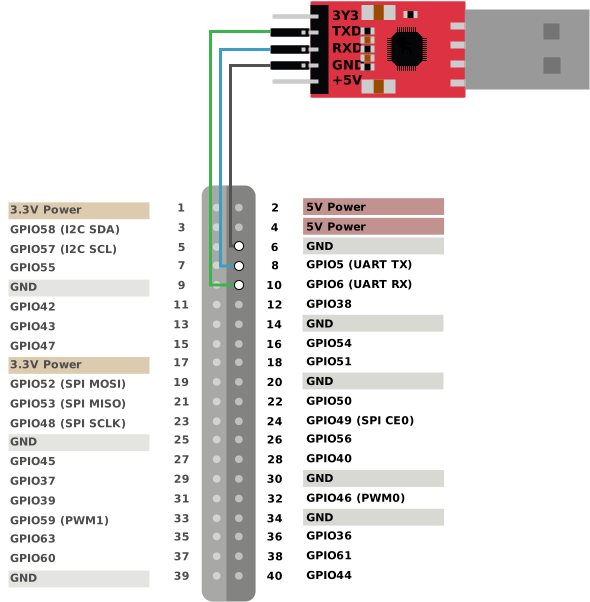
-
Configure the serial port baud rate to 115200 bps.
-
Connect VisionFive 2 to the network cable and power cord.
-
Turn on VisionFive 2 and you can see the start-up information as follows.
U-Boot SPL 2021.10 (Oct 31 2022 - 12:11:37 +0800) DDR version: dc2e84f0. Trying to boot from SPI OpenSBI v1.0 ____ _____ ____ _____ / __ \ / ____| _ \_ _| | | | |_ __ ___ _ __ | (___ | |_) || | | | | | '_ \ / _ \ '_ \ \___ \| _ < | | | |__| | |_) | __/ | | |____) | |_) || |_ \____/| .__/ \___|_| |_|_____/|____/_____| | | |_| Platform Name : StarFive VisionFive V2 Platform Features : medeleg Platform HART Count : 5 Platform IPI Device : aclint-mswi Platform Timer Device : aclint-mtimer @ 4000000Hz Platform Console Device : uart8250 Platform HSM Device : --- Platform Reboot Device : --- Platform Shutdown Device : --- Firmware Base : 0x40000000 Firmware Size : 360 KB Runtime SBI Version : 0.3 Domain0 Name : root Domain0 Boot HART : 3 Domain0 HARTs : 0*,1*,2*,3*,4* Domain0 Region00 : 0x0000000002000000-0x000000000200ffff (I) Domain0 Region01 : 0x0000000040000000-0x000000004007ffff () Domain0 Region02 : 0x0000000000000000-0xffffffffffffffff (R,W,X) Domain0 Next Address : 0x0000000040200000 Domain0 Next Arg1 : 0x0000000042200000 Domain0 Next Mode : S-mode Domain0 SysReset : yes Boot HART ID : 3 Boot HART Domain : root Boot HART Priv Version : v1.11 Boot HART Base ISA : rv64imafdcbx Boot HART ISA Extensions : none Boot HART PMP Count : 8 Boot HART PMP Granularity : 4096 Boot HART PMP Address Bits: 34 Boot HART MHPM Count : 2 Boot HART MIDELEG : 0x0000000000000222 Boot HART MEDELEG : 0x000000000000b109 U-Boot 2021.10 (Oct 31 2022 - 12:11:37 +0800), Build: jenkins-VF2_515_Branch_SDK_Release-10 CPU: rv64imacu Model: StarFive VisionFive V2 DRAM: 8 GiB MMC: sdio0@16010000: 0, sdio1@16020000: 1 Loading Environment from SPIFlash... SF: Detected gd25lq128 with page size 256 Bytes, erase size 4 KiB, total 16 MiB *** Warning - bad CRC, using default environment StarFive EEPROM format v2 --------EEPROM INFO-------- Vendor : StarFive Technology Co., Ltd. Product full SN: VF7110A1-2243-D008E000-00000001 data version: 0x2 PCB revision: 0xa1 BOM revision: A Ethernet MAC0 address: 6c:cf:39:00:14:5b Ethernet MAC1 address: 6c:cf:39:00:14:5c --------EEPROM INFO-------- In: serial@10000000 Out: serial@10000000 Err: serial@10000000 Model: StarFive VisionFive V2 Net: eth0: ethernet@16030000, eth1: ethernet@16040000 switch to partitions #0, OK mmc1 is current device found device 1 bootmode flash device 1 Failed to load 'uEnv.txt' Can't set block device Hit any key to stop autoboot: 0 StarFive # -
Press any key to stop and enter the U-Boot terminal.
-
-
Boot VisionFive 2 according to the DTB file you use.
Scenario Instructions If you use the default DTB file jh7110-visionfivev2.dtb Run the DTB file withimage.fit.-
Set the environment parameter.
If your SDK version is VF2_v3.1.5 or earlier, run the following command:setenv ipaddr 192.168.xxx.xxx; setenv serverip 192.168.xxx.xxx;setenv bootfile vmlinuz; setenv fileaddr a0000000; setenv fdtcontroladdr 0xffffffffffffffff; setenv ipaddr 192.168.xxx.xxx; setenv serverip 192.168.xxx.xxx; -
Upload the image file to DDR.
If your SDK version is VF2_v3.1.5 or earlier, run the following command:tftpboot ${loadaddr} image.fit;tftpboot ${fileaddr} ${serverip}:image.fit; -
Load the execute the file.
If your SDK version is VF2_v3.1.5 or earlier, run the following command:bootm start ${loadaddr};bootm loados ${loadaddr};run chipa_set_linux;run cpu_vol_set; booti ${kernel_addr_r} ${ramdisk_addr_r}:${filesize} ${fdt_addr_r};bootm start ${fileaddr};bootm loados ${fileaddr};run chipa_set_linux;run cpu_vol_set;booti 0x40200000 0x46100000:${filesize} 0x46000000 -
Log in with the following credentials.
buildroot login:root
Password: starfive
If you use other DTB files Run the DTB file with image.gz and initramfs.cpio.gz.-
Set the environment parameter.
If your SDK version is VF2_v3.1.5 or earlier, run the following command:setenv ipaddr 192.168.xxx.xxx; setenv serverip 192.168.xxx.xxx;setenv bootfile vmlinuz; setenv fdtcontroladdr 0xffffffffffffffff; setenv fileaddr a0000000; setenv ipaddr 192.168.xxx.xxx; setenv serverip 192.168.xxx.xxx; setenv kernel_comp_addr_r 0xb0000000;setenv kernel_comp_size 0x10000000; -
Upload the files to DDR.
If your SDK version is VF2_v3.1.5 or earlier, run the following command:tftpboot ${fdt_addr_r} jh7110-visionfive-v2-wm8960.dtb; tftpboot ${kernel_addr_r} Image.gz; tftpboot ${ramdisk_addr_r} initramfs.cpio.gz; run chipa_set_linux;run cpu_vol_set;tftpboot ${fdt_addr_r} jh7110-visionfive-v2-wm8960.dtb; tftpboot ${kernel_addr_r} Image.gz; tftpboot ${ramdisk_addr_r} initramfs.cpio.gz; run chipa_set_linux; -
Load and execute the files.
If your SDK version is VF2_v3.1.5 or earlier, run the following command:booti ${kernel_addr_r} ${ramdisk_addr_r}:${filesize} ${fdt_addr_r}booti ${kernel_addr_r} ${ramdisk_addr_r}:${filesize} ${fdt_addr_r} -
Log in with the following credentials.
buildroot login:root
Password: starfive
-