Jump to main content
Documentation Center
Index
  1. Home
  2. VisionFive 2

    World's first high-performance RISC-V single board computer (SBC) with an integrated GPU

  3. Configure and Debug with 40-Pin Header

  • VisionFive 2

    World's first high-performance RISC-V single board computer (SBC) with an integrated GPU

    • Feature Overview

    • Specification

    • Peripherals

    • Design Resources

    • Run SDK on VisionFive 2

    • Run Debian on VisionFive 2

    • Build File Systems

    • Configure and Debug with 40-Pin Header

      • GPIO Pinout
      • Preparation
      • Configure GPIO
      • Configure and Debug I2C
      • Configure and Debug SPI
      • Configure and Debug PWM
      • Configure and Debug UART
      • Peripheral Examples
    • Configure Device Drivers

    • Application Notes

    • Industrial Control Applications

    • Errata

  • VisionFive 2 Lite

    A budget-friendly and feature-rich RISC-V single board computer

  • JH-7110

    Word's first mass-produced high-performance RIS-V application processor

  • VisionFive

    World's first generation affordable RISC-V boards designed to run Linux

  • JH-7100

    Intelligent vision processing platform

  • StarStudio IDE

    Integrated Development Environment for Linux and Bera Metal development

Configure and Debug with 40-Pin Header

The 40-pin header of VisionFive 2 enables you to interface the board with a variety of external components.
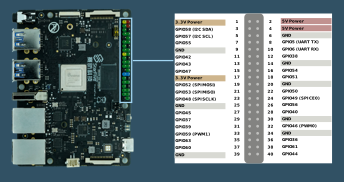
Figure 1. 40-Pin Header
Using the 40-pin header, you can configure and debug the GPIO, I2C, SPI, PWM, and UART interfaces:
  • Configure GPIO

  • Configure and Debug I2C

  • Configure and Debug SPI

  • Configure and Debug PWM

  • Configure and Debug UART

For examples about how to use the 40-pin header, see Peripheral Examples.

Generated by <oXygen/> XML WebHelp