
Burn the OpenPLC Runtime for Arduino
- Connect Arduino UNO and PC by USB;
- Open the OpenPLC runtime and prepare the program needed to run Arduino UNO as a Modbus-TCP slave device;
- Click the icon, as in Step 1, to open the detailed settings. Choose Board type as Arduino UNO and select the corresponding COM port. Select Enable Modbus RTU (Serial) to enable communication between the Arduino UNO and the master device via Serial;
- Click the Upload button to compile and upload the program and OpenPLC micro-runtime to the Arduino UNO. The message Done will be displayed when the upload process is completed.
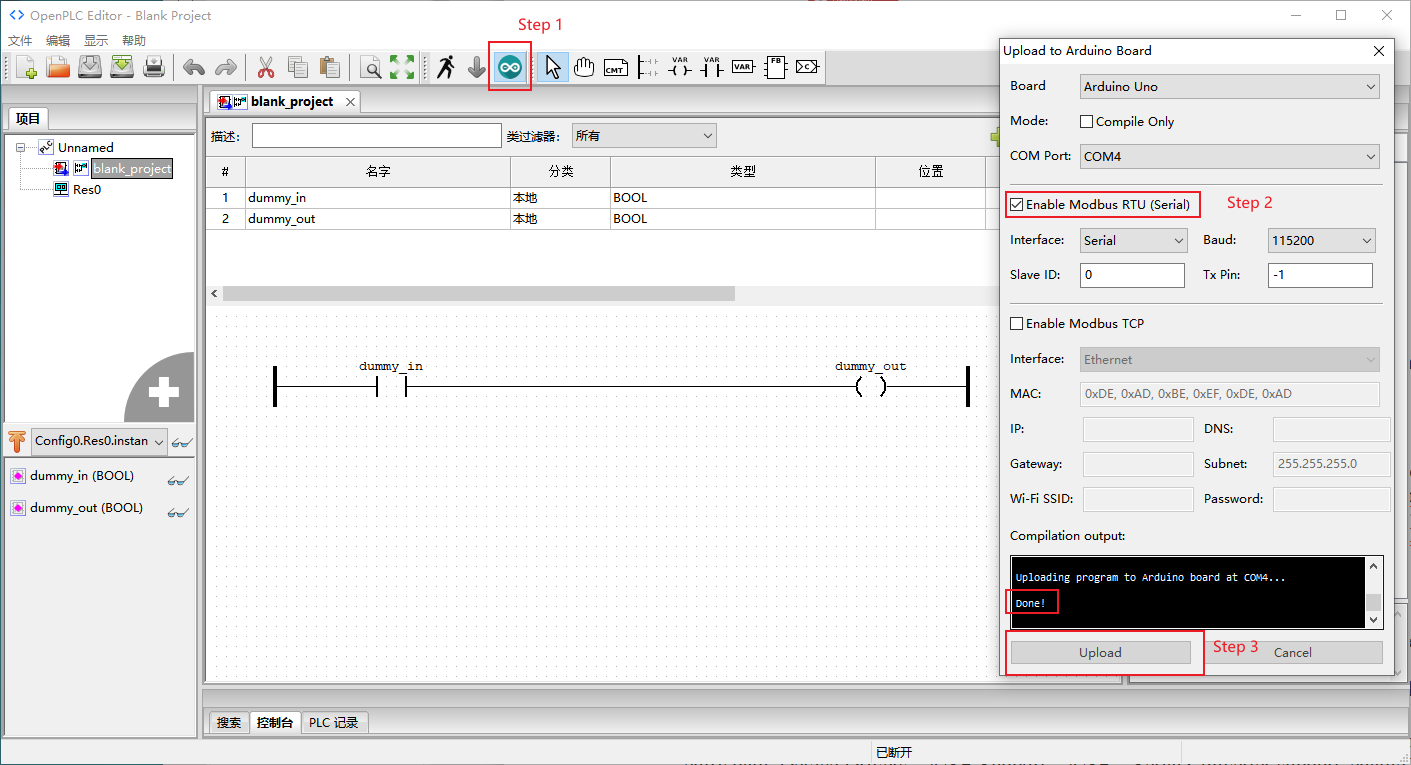
The special blank ladder diagram program to the Arduino UNO by reference to: https://openplcproject.com/docs/2-6-slave-devices/
Then upload the ladder diagram program (the same as the program in Modbus-TCP) to the Modbus-RTU master (VisionFive 2 or VisionFive 2 Lite).