Cross-compile Linux Kernel
Follow the steps below to cross-compile the Linux kernel:
- Execute the following to install dependencies and create the
kernel:
apt-get install build-essential linux-source bc kmod cpio flex libncurses5-dev libelf-dev libssl-dev dwarves bison git
- Check out the kernel files from StarFive
GitHub:
git clone https://github.com/starfive-tech/linux
- Execute the following command to switch to code branch:
cd linux
git checkout -b JH7110_VisionFive2_devel origin/JH7110_VisionFive2_devel
git pull
- Execute the following command to set the default configuration of compiling Linux
kernel:
make <Configuration_File> CROSS_COMPILE=riscv64-linux-gnu- ARCH=riscvwhere,
Configuration_Fileisstarfive_visionfive2_defconfig. - Execute the following command to set other software configuration of compiling Linux kernel:
make CROSS_COMPILE=riscv64-linux-gnu- ARCH=riscv menuconfig
- Compile the Linux
kernel:
make CROSS_COMPILE=riscv64-linux-gnu- ARCH=riscv -<jx>
Change the -jx value according to the number of cores in your CPU. If your CPU has 8 cores, change this to -j8. This process may take some time.
This script generates he following files which are used when porting rootfs, dtb, and the kernel to VisionFive 2:- The kernel image file Image.gz is created
under the linux/arch/riscv/boot directory.
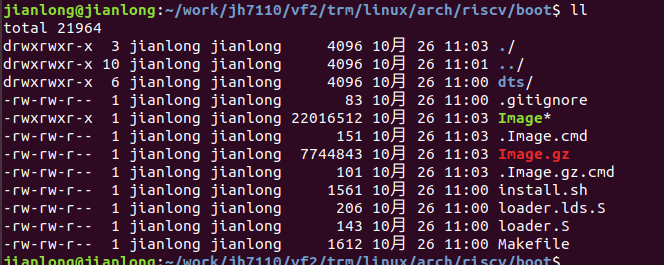
- The dtb file Image.gz is created under the
linux/arch/riscv/boot directory.
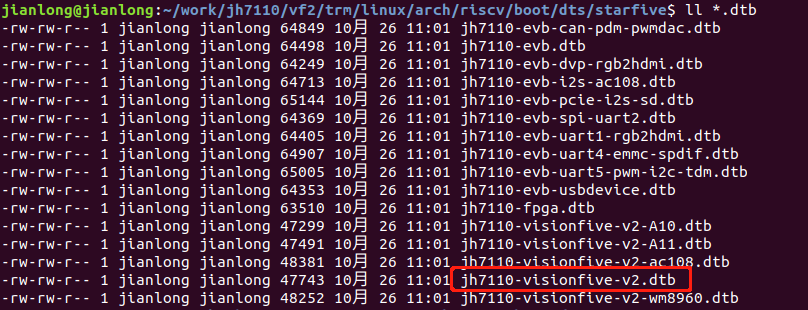
- The kernel image file Image.gz is created
under the linux/arch/riscv/boot directory.