Download OpenWrt
The official OpenWrt mainline has now incorporated support for the StarFive VisionFive 2 and VisionFive 2 Lite. You can choose to download the OpenWrt source code from the official website and compile it yourself, allowing for custom configuration based on your needs. Alternatively, you can directly download the pre-built VisionFive 2 or VisionFive 2 Lite image from the official website, which skips the configuration and compilation stages by using the official predefined settings.
Download OpenWrt Source Code
Download the OpenWrt source code and customize it based on your business needs.
-
Execute the following command to download the code (it is recommended to compile on Ubuntu 20 or higher versions.):
git clone https://github.com/starfive-tech/openwrt.git
Alternatively, execute the following command:git clone https://github.com/openwrt/openwrt.git
-
Execute the following command to switch to version 24.10.1:
git checkout v24.10.1
Download OpenWrt Image
-
Click the following link to visit the official website:https://openwrt.org/toh/views/toh_fwdownload
-
In the Table of Hardware section at the bottom of the page, enter StarFive in the search bar to find compatible images. The images compatible with the VisionFive 2 or VisionFive 2 Lite are listed in the table.
Figure 1. Image Search Results 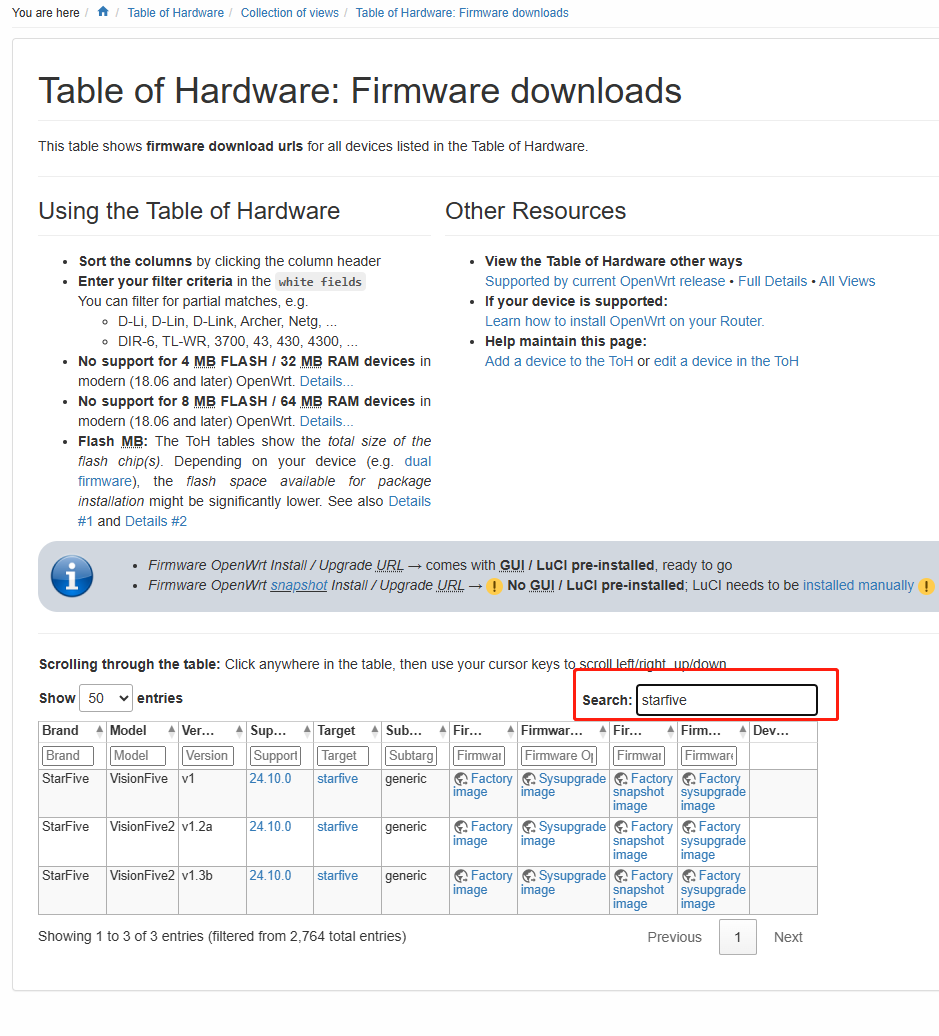
-
Download the corresponding image based on your VisionFive 2 or VisionFive 2 Lite version.