You can enable VisionFive 2 to support different peripherals by enabling different device
tree files. For example, the default kernel of the Debian202403 image supports the
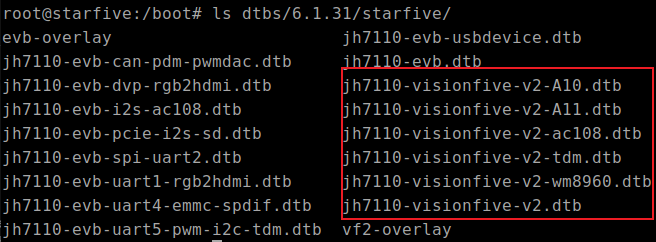
following different device tree files:Figure 1. dtb Files
jh7110-visionfive-v2.dtb: for Version 1.2A and 1.3B
board
jh7110-visionfive-v2-ac108.dtb: for version 1.2A and 1.3B
board with ac108 codec
jh7110-visionfive-v2-tdm.dtb: for version 1.2A and 1.3B
board with tdm sound card
jh7110-visionfive-wm8960.dtb: for Version 1.2A and 1.3B
board with wm8960 codec
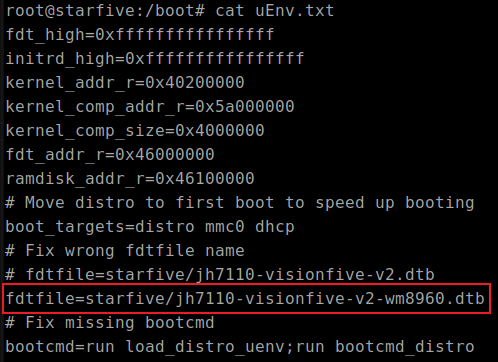
You can modify the uEnv.txt file to decide which device tree file is
loaded when VisionFive 2 starts. The following modifies the
uEnv.txt file to use
jh7110-visionfive-v2-wm8960.dtb to support the wm8960
codec:Figure 2. Modify uEnv.txt File
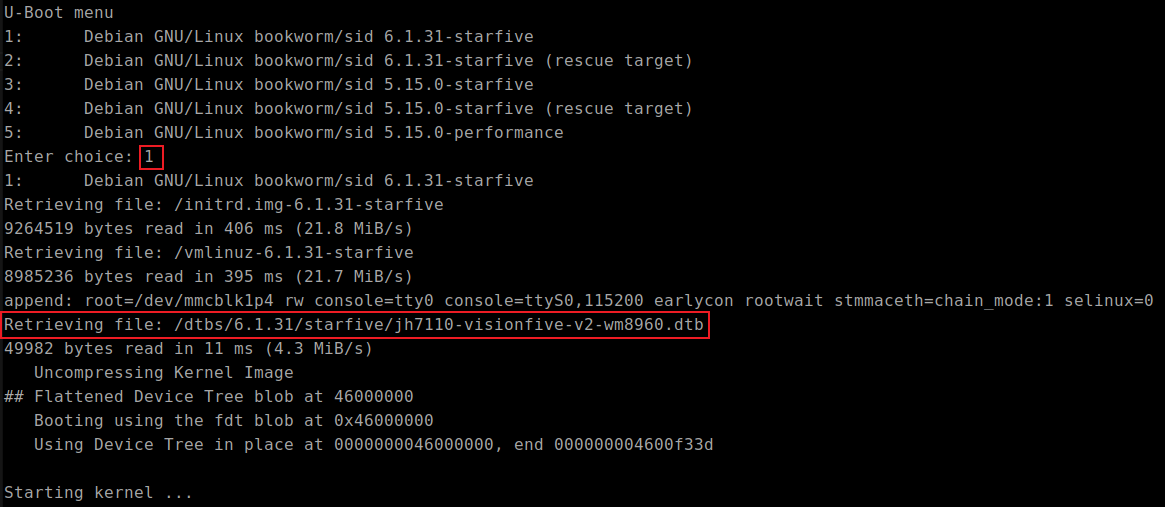
After re-powering on and selecting the corresponding kernel, it can be found that
jh7110-visionfive-v2-wm8960.dtb has been correctly loaded from
the corresponding path:Figure 3. Verification