Prerequisites
Before building and compiling the AMP system, make sure you prepare for the items listed in this topic.
Connect RT-Thread Serial Port
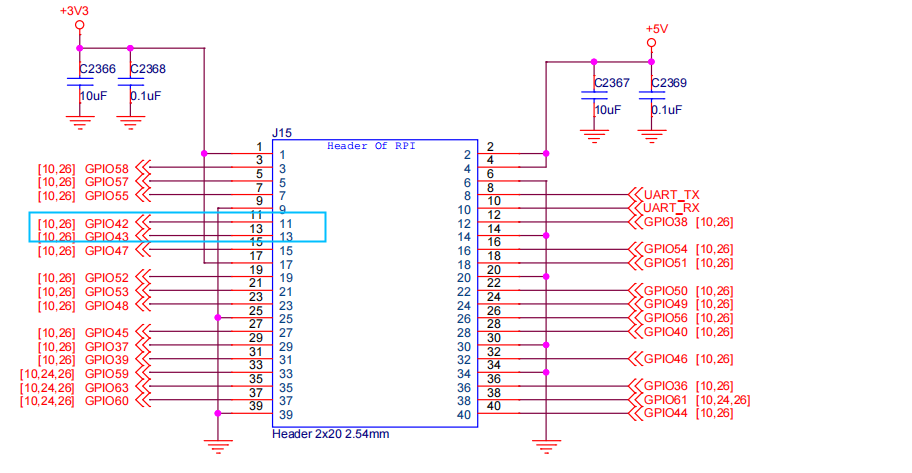
RT-Thread uses UART2 as its system console. In this application, pin11 and pin13 on the 40-pin GPIO header of VisionFive 2 or VisionFive 2 Lite are used as RX/TX pins.
| Pin | Function |
|---|---|
| Pin 9 | GND |
| Pin 11 (GPIO42) | UART2 RX |
| Pin 13 (GPIO43) | UART2TX |
Software Requirements
All AMP code has been merged into StarFive Linux 6.6 SDK.
Download it from: https://github.com/starfive-tech/VisionFive2/tree/JH7110_VisionFive2_6.6.y_devel
APM Source Code
Linux-side code (in the kernel tree)
| Component | Description |
|---|---|
| RPMsg code |
RPMsg (Remote Processor Messaging) defines the standard binary interface used for communication between cores in the AMP system. Locate the RPMsg code
at:
|
| Mailbox code | Locate the mailbox code
at: |
| AMP DTS file | Locate the device tree file at:
|
RT-Thread code (in the SDK)
| Component | Description |
|---|---|
| JH7110 BSP (Clock, Pinctrl, GPIO, apps) |
Contains driver code of JH-7110 Clock, Pinctrl and GPIO, and
other simple
applications.
|
| RPMsg-Lite (virtio-based IPC) | Locate the mailbox code
at: |
| Drivers (UART, GMAC, PCIe, CAN, etc.) | Open-source rpmsg-lite code, which is also
the open-source virtio-base code of RPMsgSend,
which sends and receives data with Linux according to the
protocol.
|
| Test applications | Locate the test applications
at: |