Configure and Debug SPI
Configure dts File
Configure the jh7110-visionfive-v2.dtsi file that is under /linux/arch/riscv/boot/dts/starfive.
The spi0 to spi6 channels are for the SPI bus. You can configure the unoccupied GPIOs as desired. The following is the default setting.
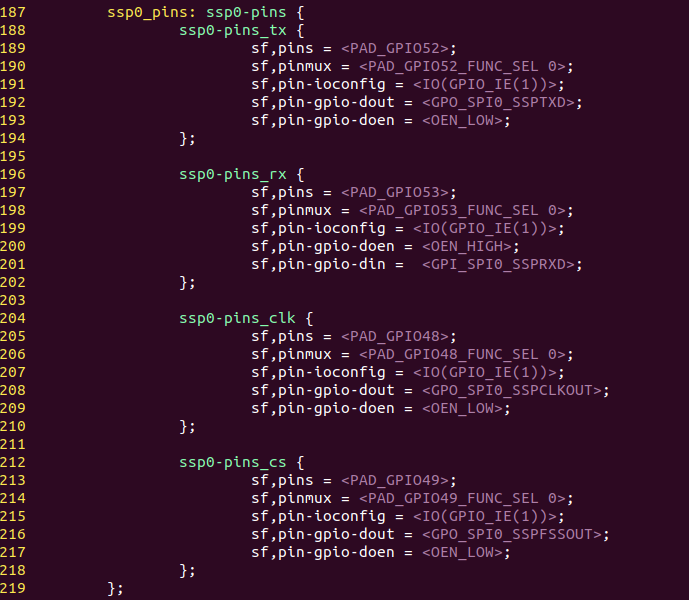
Loopback Test
To perform the loopback test for SPI:
-
Connect Pin 19 with Pin 21 as follows.
Figure 2. Connect Pin 19 with 21 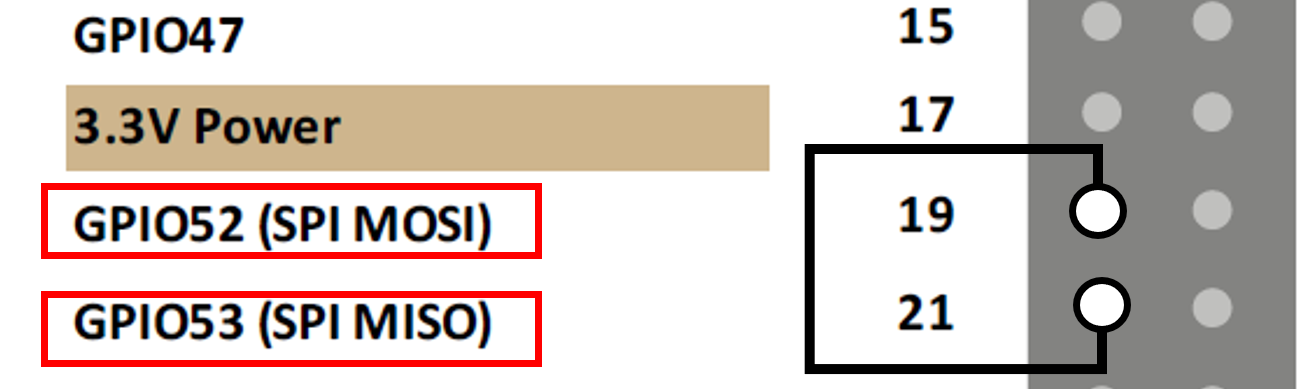
-
Locate the following path for the spidev_test.c test tool.
cd /linux/tools/spi -
Execute the following command under the test tool directory:
It generates the spidev_test file in the same directory.make CROSS_COMPILE=riscv64-linux-gnu- ARCH=riscv -
Upload the spidev_test file to VisionFive 2, and change the execution permission by running the following:
chmod +x spidev_test -
Confirm the SPI device.
ls /dev/spidev* -
Perform the test.
where, spidev1.0 is the device name obtained from the previous step../spidev_test -D /dev/spidev1.0 -v -p string_to_sendFigure 3. Example Output 
If the TX and RX outputs are the same, as shown in the example output, it indicates the test is successful.
Test SPI with ADXL345 Module
To test SPI with the ADXL345 module:
-
connect the ADXL345 module to the 40-pin header as follows.
Figure 4. Connect ADXL345 Module to the Header 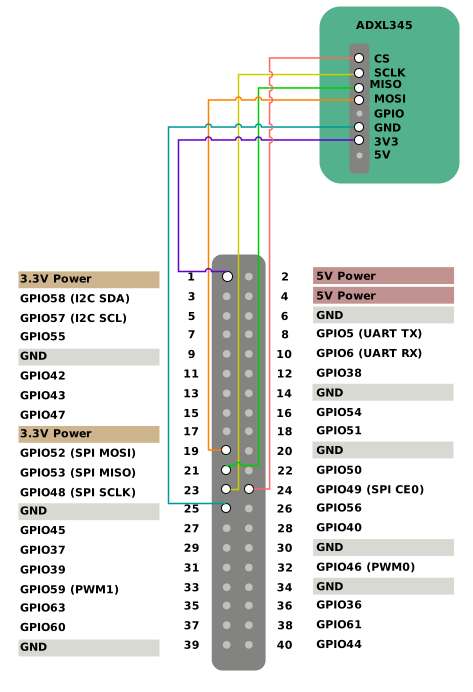
-
Locate the following path for the spidev_test.c test tool.
cd /linux/tools/spi -
Execute the following command under the test tool directory:
It generates the spidev_test file in the same directory.make CROSS_COMPILE=riscv64-linux-gnu- ARCH=riscv -
Upload the spidev_test file to VisionFive 2, and change the execution permission by running the following:
chmod +x spidev_test -
Confirm the SPI device.
ls /dev/spidev* -
Read the device ID.
./spidev_test -H -O -D /dev/spidev1.0 -v -p \\x80\\x00 -
Read the value for multiple registers.
./spidev_test -H -O -D /dev/spidev1.0 -v -p \\xec\\x00\\x00\\x00\\x00\\x00\\x00 -
Execute the following to read:
./spidev_test -H -O -D /dev/spidev1.0 -v -p \\x9e\\x00 -
Execute the following to write:
./spidev_test -H -O -D /dev/spidev1.0 -v -p \\x1e\\xaa -
Read the verification.
./spidev_test -H -O -D /dev/spidev1.0 -v -p \\x9e\\x00