Install OpenPLC
This section provides step-by-step instructions for installing OpenPLC runtime, required dependencies, and the VisionFive.gpio library.
Prerequisites
Before installing OpenPLC, verify that the following conditions are met:
| Prerequisite | Details |
|---|---|
| Environment Requirements |
|
| Hardware Requirements |
|
| Software | Flash the Debian OS image into VisionFive 2 or VisionFive 2 Lite. For details, see Flash OS to a Micro-SD Card. |
Install Dependencies
Before installing OpenPLC, all required software packages must be installed. Execute
the following command to install the
dependencies:
sudo apt-get install -y curl git udev libxml2-dev autoconf automake autotools-dev icu-devtools libicu-dev libsigsegv2 m4 autoconf-archive gnu-standards libtool gettext m4 make cmake build-essential pkg-config bison flex libtool nodejs libbz2-dev sqlite3 libgdbm-dev openssl libexpat1-dev python3-dev python3 libxslt-dev libmodbus5 python3-venv libasio-devNote: The Python version used by the system can be verified with
python3 -V. The official default version is
3.11.Install OpenPLC Runtime
To install the OpenPLC runtime package:
-
Download the Debian OpenPLC package from https://debian.starfivetech.com/(VisionFive2/Engineering Release/202409/debian-packs/openplc.zip).
-
Navigate to the directory that contains the downloaded OpenPLC package and run the following command to install the package:
sudo dpkg -i openplc-vf2.deb -
Create a Python virtual environment and install required Python packages:
cd <openplc_v3 directory>
sudo python3 -m venv .venv
sudo .venv/bin/python3 -m pip install requests wget bs4 flask==2.3.3 werkzeug==2.3.7 flask-login==0.6.2 pyserial pymodbus==2.5.3
Install VisionFive.gpio Library
The VisionFive.gpio library provides GPIO control functionality required by OpenPLC.
The OpenPLC runtime is installed under sudo, so VisionFive.gpio
should also be installed with sudo.
-
Run the following command to check the Python version and select the correct VisionFive.gpio wheel file (
.whl)
If it is version 3.10, install the cp310 version; if it is version 3.11, install the cp311 version.sudo .venv/bin/python3 -VFigure 1. whl File List 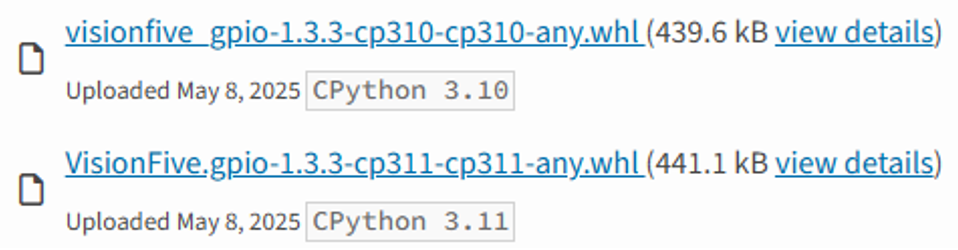
- Execute the following command to run the installation scriptWhere
Install_VisionFive_gpio.py:sudo .venv/bin/python3 -m pip install $(path_to_whl)/VisionFive.gpio-1.3.3-cp31x-cp31x-linux_riscv64.whl
$(path_to_whl)is the path pointing to the VisionFive.gpioxxx.whl file. The x in VisionFive.gpio-1.3.3-cp31x-cp31x-linux_riscv64.whl depends on the Python version. -
Reboot the system.
sudo reboot