Make a Buzzer Beep
This section describes how to use VisionFive 2 or VisionFive 2 Lite's GPIO pins to make a buzzer beep through an example program with Python.
Hardware Setup
Connect the buzzer to the 40-pin header of VisionFive 2 or VisionFive 2 Lite as follows.
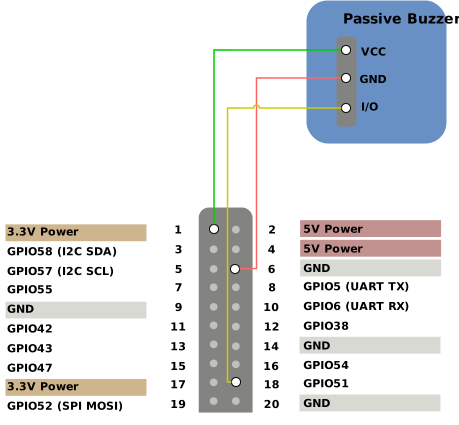
| Passive Buzzer | 40-Pin GPIO Header | |
|---|---|---|
| Pin Number | Pin Name | |
| VCC | 1 | 3.3V Power |
| GND | 6 | GND |
| I/O | 18 | GPIO51 |
Run Demo Code
Perform the following steps on Debian of VisionFive 2 or VisionFive 2 Lite.
-
Locate the directory where the test code,
buzzer.py, exists.-
Source into the PYthon3 Virtual Environment.
source ./myvenv/bin/activate -
Install the dependency.
python3 -m pip install pillow -
Get the directory where
VisionFive.gpioexists.python3 -m pip show VisionFive.gpioNote: The output depends on how the application is installed. -
Enter the
VisionFive.gpiodirectory.cd <VisionFive.gpiodirectory> -
Enter the
sample-codedirectory.cd ./VisionFive/sample-code/
-
Under the
sample-codedirectory, execute the following command to run the demo code.
Alternatively, you can also run the following command.sudo python buzzer.pysudo python3 buzzer.pyNote: For details about the source code, see buzzer.py Source Code.-
Enter the values as prompted to configure the pitch and the lasting time of the beeps.
-
Enter Pitch (200 to 20000): The frequency (in Hz) of the buzzer, ranging from 200 to 20000
Note: If your value is out of the range, a warning message is displayed. -
Enter Cycle (seconds): The duration (in seconds) the buzzer keeps beeping
-
-
(Optional) Exit the Python3 Virtual Environment.
deactivate