Read GPS Data
This section describes how to use VisionFive 2 or VisionFive 2 Lite's UART to read GPS data through an example program with Python.
Hardware Setup
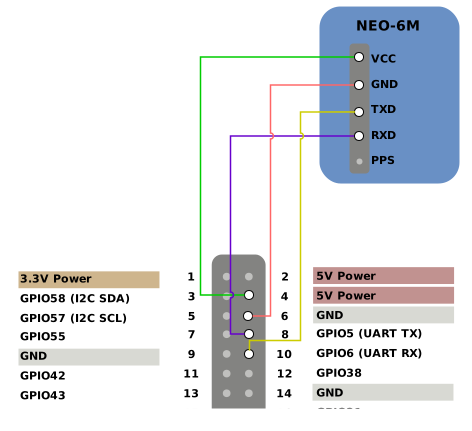
Connect NEO-6M GPS to the 40-pin header of VisionFive 2 or VisionFive 2 Lite as follows.
 s
| NEO-6M | 40-Pin GPIO Header | |
|---|---|---|
| Pin Number | Pin Name | |
| VCC | 4 | 5V Power |
| GND | 6 | GND |
| TXD | 10 | GPIO6 (UART RX) |
| RXD | 8 | GPIO5 (UART TX) |
Run Demo Code
Perform the following steps on Debian of VisionFive 2 or VisionFive 2 Lite.
-
Locate the directory where the test code,
uart_gps_demo.py, exists.-
Source into the PYthon3 Virtual Environment.
source ./myvenv/bin/activate -
Install the dependency.
python3 -m pip install pillow -
Get the directory where
VisionFive.gpioexists.python3 -m pip show VisionFive.gpioNote: The output depends on how the application is installed. -
Enter the
VisionFive.gpiodirectory.cd <VisionFive.gpiodirectory> -
Enter the
sample-codedirectory.cd ./VisionFive/sample-code/
-
-
Execute the following before running the demo code:
sudo systemctl stop serial-getty@ttyS0.service Under the
sample-codedirectory, execute the following command to run the demo code.
Alternatively, you can also run the following command.sudo python uart_gps_demo.py
If the GPS signal is weak, the terminal output is like the following:sudo python3 uart_gps_demo.py*****The GGA info is as follows: ***** msg_id: $GPGGA NorS: EorW: pos_indi: 0 total_Satellite: 00 !!!!!!Positioning is invalid!!!!!!If the GPS signal is strong, the terminal output is like the following, generated in a few seconds:*****The GGA info is as follows: ***** msg_id: $GPGGA utc time: 2:54:47.0 utc time: 025447.00 (format: hhmmss.sss) latitude: 30 degree 33.29251 minute latitude: 3033.29251 (format: dddmm.mmmmm) NorS: N longitude: 104 degree 3.45523 minute longitude: 10403.45523 (format: dddmm.mmmmm) EorW: E pos_indi: 1 total_Satellite: 08 *****The positioning type is 3D ***** The Satellite ID of channel {} : {} ch1 : 14 ch2 : 01 ch3 : 03 ch4 : 06 ch5 : 30 ch6 : 21 ch7 : 19 ch8 : 17Note: For details about the source code, see uart_gps_demo.py Source Code.-
(Optional) Exit the Python3 Virtual Environment.
deactivate