Basic Edge Detection
This section describes how to use VisionFive 2 or VisionFive 2 Lite's GPIO pins to detect the signal of a button (that is, the rising edge and falling edge) through an example program with Python.
Hardware Setup
Connect pin ① and pin ② of the button to the breadboard first, and then connect pin ③ and pin ④ to VisionFive 2 or VisionFive 2 Lite. The following table and figure describe how to connect the button to the 40-pin GPIO Header:
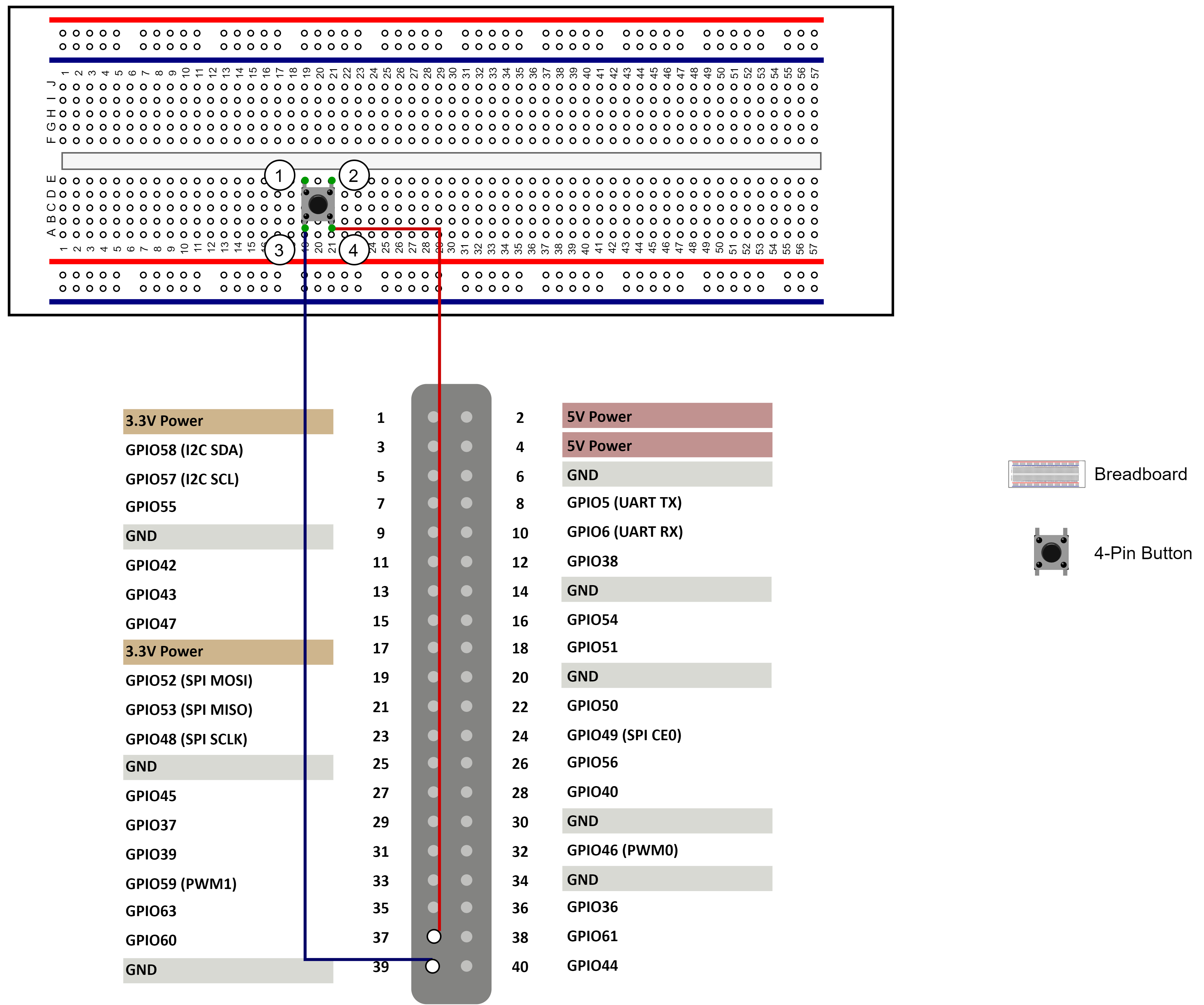
| Button | 40-Pin GPIO Header | |
|---|---|---|
| Pin Number | Pin Name | |
| Pin ④ | 37 | GPIO60 |
| Pin ③ | 39 | GND |
Run Demo Code
Perform the following steps on Debian of VisionFive 2 or VisionFive 2 Lite.
-
Locate the directory where the test code,
basic_edge_detection.py, exists.-
Source into the Python3 Virtual Environment.
source ./myvenv/bin/activate -
Install the dependency.
python3 -m pip install pillow -
Get the directory where
VisionFive.gpioexists.python3 -m pip show VisionFive.gpioNote: The output depends on how the application is installed. -
Enter the
VisionFive.gpiodirectory.cd <VisionFive.gpiodirectory> -
Enter the
sample-codedirectory.cd ./VisionFive/sample-code/
-
Under the
sample-codedirectory, execute the following command to run the demo code.
Alternatively, you can also run the following command.sudo python basic_edge_detection.pysudo python3 basic_edge_detection.pyThe terminal displays the following:# python3 basic_edge_detection.py *-----------------------Case 1-------------------------* Please press the key on pin 37 once at any time !!!Press the button, and the terminal displays the following:*-----------------------------------* Falling edge is detected on pin 37 ! *-----------------------------------* Rising edge is detected on pin 37 !Note: For details about the source code, see basic_edge_detection.py Source Code.-
(Optional) Exit the Python3 Virtual Environment.
deactivate