I2S External Codecs Configuration
The JH7110 I2S module supports up to 8 channels. All the 8 channels can connect to the external codecs of WM8960 or AC108. This section describes how to configure the WM8960 and AC108 codecs through device tree overlays.
Prerequisites
Preparing for the following for connecting to external codecs:
| Preparation | Details |
|---|---|
| Hardware |
|
| Software |
|
Configure WM8960 and AC108 Codecs
Add the following to the
freelight-u-sdk/linux/arch/riscv/boot/dts/starfive/jh7110-visionfive-v2-wm8960.dts
(for WM8960) or the
freelight-u-sdk/linux/arch/riscv/boot/dts/starfive/jh7110-visionfive-v2-ac108.dts
(for AC108):&sound{
simple-audio-card,dai-link@1 {
reg = <0>;
status = "okay";
format = "i2s";
bitclock-master = <&sndcodec1>;
frame-master = <&sndcodec1>;
widgets =
"Microphone", "Mic Jack",
"Line", "Line In",
"Line", "Line Out",
"Speaker", "Speaker",
"Headphone", "Headphone Jack";
routing =
"Headphone Jack", "HP_L",
"Headphone Jack", "HP_R",
"Speaker", "SPK_LP",
"Speaker", "SPK_LN",
"LINPUT1", "Mic Jack",
"LINPUT3", "Mic Jack",
"RINPUT1", "Mic Jack",
"RINPUT2", "Mic Jack";
cpu0 {
sound-dai = <&i2srx_3ch>;
};
cpu1 {
sound-dai = <&i2stx_4ch1>;
};
sndcodec1:codec {
sound-dai = <&wm8960>;
clocks = <&wm8960_mclk>;
clock-names = "mclk";
};
};
};Parameter explanations:
| Property | Value | Notes |
|---|---|---|
format |
"i2s" |
Uses I2S audio bus format |
bitclock-master |
<&sndcodec1> |
Codec drives BCLK |
frame-master |
<&sndcodec1> |
Codec drives LRCK |
cpu0 |
<&i2srx_3ch> |
Capture CPU DAI — receives data from codec ADC |
cpu1 |
<&i2stx_4ch1> |
Playback CPU DAI — sends data to codec DAC |
sndcodec1 |
<&wm8960> |
Codec DAI reference defined in
sf_wm8960.dtsi |
clocks |
<&wm8960_mclk> |
Master clock for the codec |
Verify External Codecs Connection
Verify the following for connection to external codecs:
- Make sure OS can boot and the audio card has been registered successfully.
- Use the command
cat /proc/asound/cardsto check the existing audio cards. - Use
aplay -lto check the audio playback device. - Use
arecord -lto check the audio record device.
- Use the command
- Make sure I2C is working properly.
- Use the command i2cdetect to search codec device
(wm8960’s address is 0x1a )
Figure 1. I2C Detect 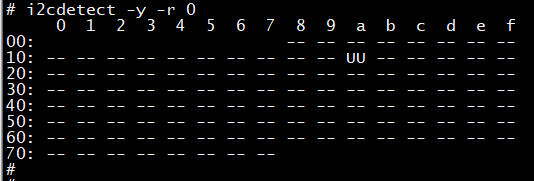 Note: UU in the above screen indicates wm8960 is present.
- Use the debug nodes of the external codec to read and write the
registers for I2C communication
debug.
mount -t debugfs none /mntcat /mnt/wm8960_reg
- Use the command i2cdetect to search codec device
(wm8960’s address is 0x1a )
- Verify the playback and record functions.
Usage:
Playback:aplay -Dhw:0,1 -f S32_LE -r16000 -t wav sound_32b_16k.wavRecord:arecord -Dhw:0,0 -f S32_LE -r16000 -c2 -d 10 -t wav sound_32b_16k.wav