Port Bluetooth Driver
Port Bluetooth Driver
Place the AIC8800 Bluetooth driver into the kernel tree:
-
Place the
aic8800bluetooth driver package under the /linux/driver/bluetooth directory. -
Add the following content to /linux/driver/bluetooth/Kconfig:
config BT_AICBTUSB tristate "AIC HCI USB driver" depends on USB help AIC Bluetooth HCI USB driver -
Enable Add the following content to /linux/driver/bluetooth/Makefile:
obj-$(CONFIG_BT_AICBTUSB) += aic_btusb.o
Enable Bluetooth Driver in Kernel Configuration
Enable the AIC8800 Bluetooth driver support in the kernel configuration。
-
Enter the Device Drivers > Bluetooth subsystem support menu, and select the Bluetooth device drivers option.
-
Compile AIC HCI USB driver into a module.
Figure 1. AIC HCI USB driver 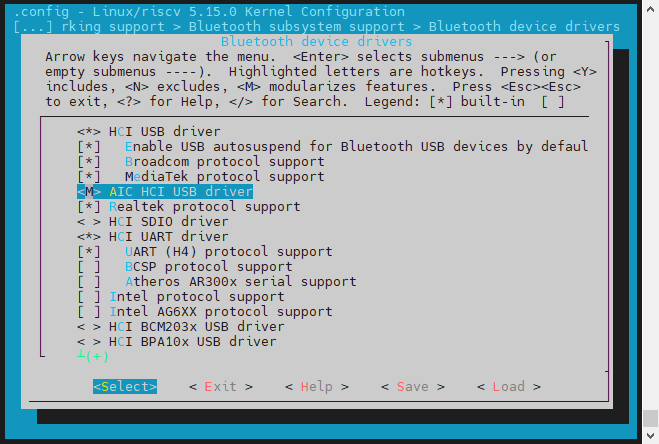
- Save your change before you exit the kernel configuration dialog.
Bring up Bluetooth Interface
After building and booting the kernel with the AIC8800 driver, you can run the
following to bring up the Bluetooth
interface:
hciconfig hci0 up