Port and Configure Wi-Fi Driver
Port Wi-Fi Driver
Place the AIC8800 driver source into the kernel tree and register it with the build
system.
-
Place the driver package under /linux/driver/net/wireless directory.
-
Add the following content to /linux/driver/net/wireless/Makefile:
obj-$(CONFIG_AIC_WLAN_SUPPORT) += aic8800/ -
Add the following content to /linux/driver/net/wireless/Kconfig:
source "drivers/net/wireless/aic8800/Kconfig" -
Copy the AIC8800 firmware package to the target root filesystem: /lib/firmware.
Enable Wi-Fi Driver in Kernel Configuration
Enable the AIC8800 Wi-Fi driver and firmware loading support in the kernel
configuration。
-
Enter the Device Drivers > Network device support > Wireless LAN menu, and select the AIC wireless Support option.
Figure 1. AIC wireless Support 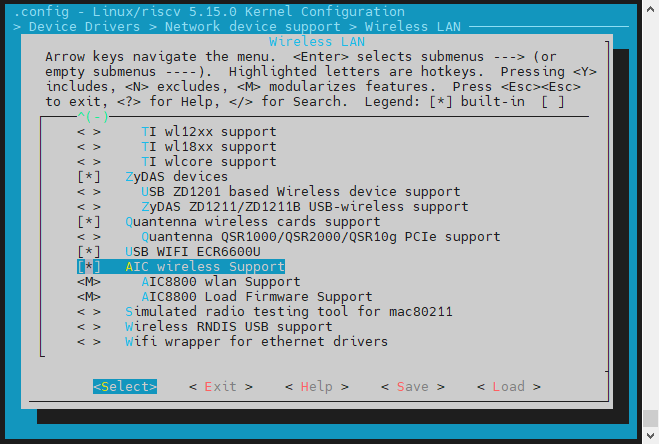
-
Compile AIC8800 wlan Support and AIC8800 Load Firmware Support into a module.
Figure 2. AIC8800 Load Firmware Support 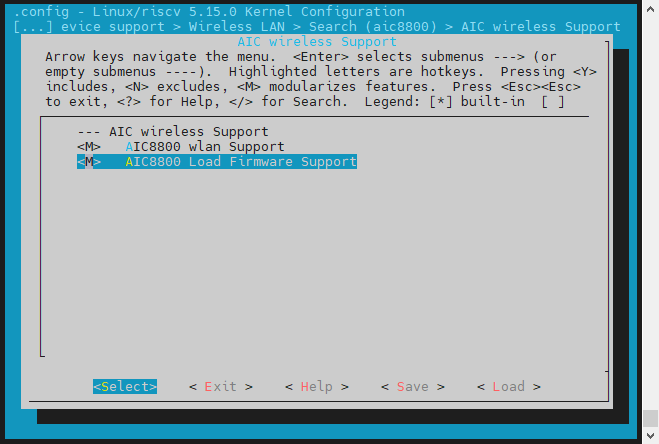
- Save your change before you exit the kernel configuration dialog.
Bring up Wi-Fi Interface
After building and booting the kernel with the AIC8800 driver, you can run the
following to bring up the Wi-Fi
interface:
ifconfig wlan0 up