FFmpeg
FFmpeg is the leading multimedia framework, able to decode, encode, transcode, mux, demux, stream, and filter audio and video resources.
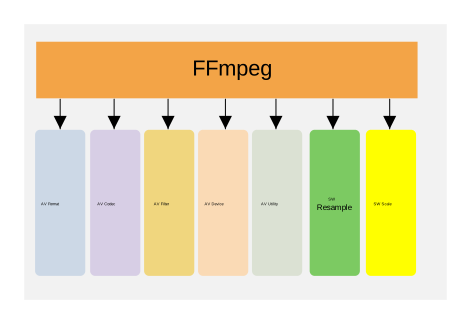
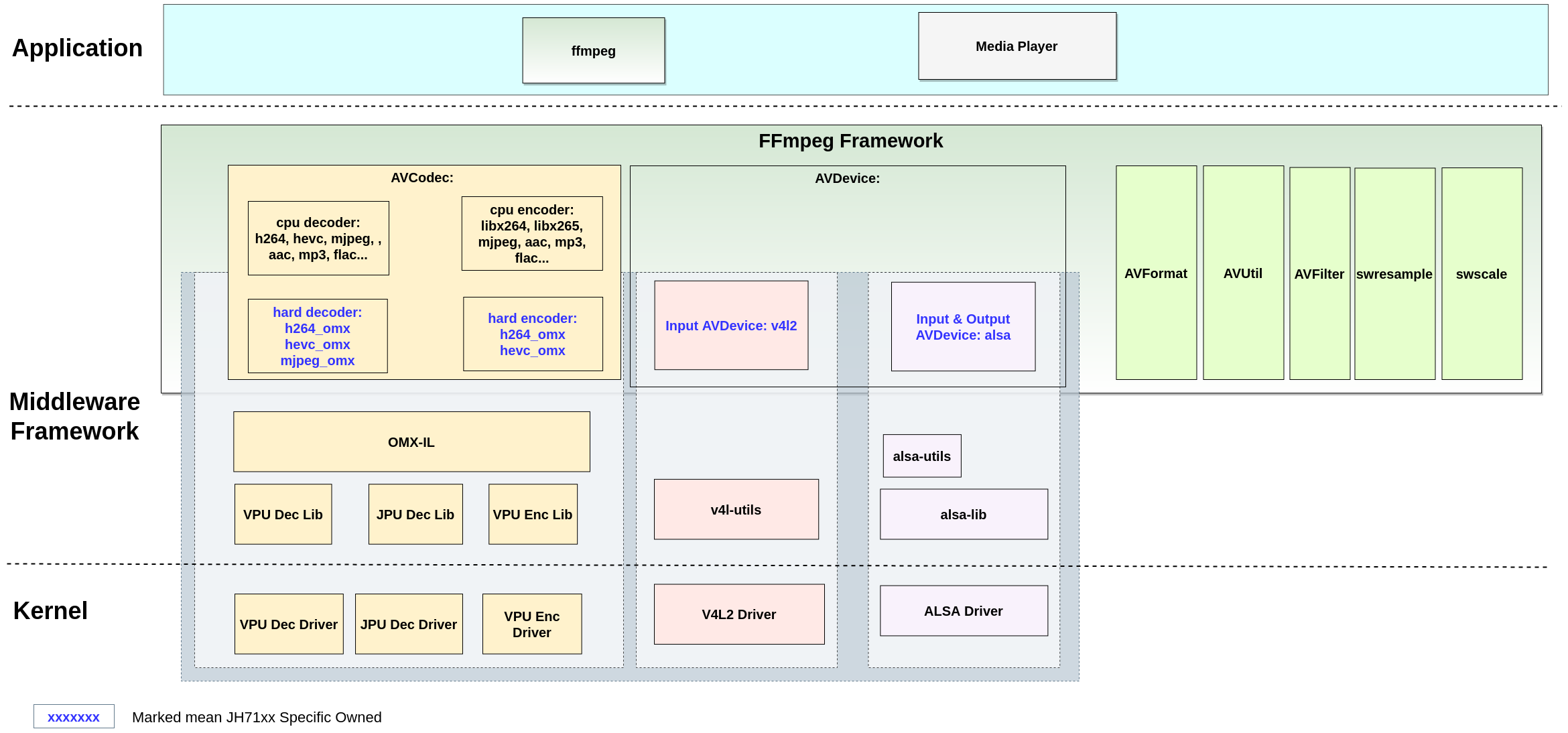
Build FFmpeg
Within the JH-7110 software SDK, FFmpeg is compiled via Buildroot. You can obtain the corresponding source code in GitHub.
apt install ffmpeg-
Enable the related macros (all enabled by default).
BR2_PACKAGE_FFMPEG_GPL=y
BR2_PACKAGE_FFMPEG_FFPROBE=y
BR2_PACKAGE_FFMPEG_AVRESAMPLE=y
BR2_PACKAGE_FFMPEG_POSTPROC=y
BR2_PACKAGE_WAVE511=y
BR2_PACKAGE_WAVE420L=y
BR2_PACKAGE_CODAJ12=y
BR2_PACKAGE_SF_OMX_IL=y
Check the full plugin list via the path: menuconfig > Target packages > Audio and video applications > ffmpeg and menuconfig > Target packages > starfive packages
-
Run the following commands directly under the SDK root directory to compile FFmpeg.
make buildroot_initramfs-menuconfig
make buildroot_rootfs-menuconfig
FFmpeg Commands
| Command | Description | Example |
|---|---|---|
| ffprobe |
The command For example it can be used to check the format of the container used by a multimedia stream and the format and type of each media stream contained in it. It can be used to inspect the media source such as video file and audio file, and supports most containers including MP4, AVI, and WAV. |
|
| ffmpeg | The command ffmpeg is used to call a very
fast video and audio converter that can also grab from a live
audio/video source. It can also convert between arbitrary sample
rates and resize video on the fly with a high quality poly-phase
filter. |
This command takes the original AVI video
The following diagram illustrates the transcoding process. 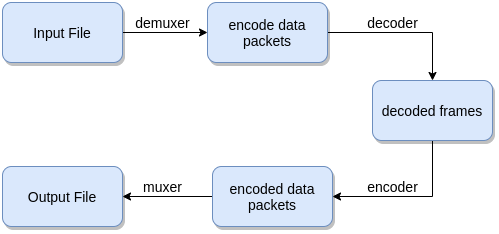
|
| ffplay | The command ffplay is used to call a very
simple and portable media player using the FFmpeg libraries and
the SDL library. It is mostly used as a testbed for the various
FFmpeg application interfaces. |
input.avi immediately in a pop-up ffplay
window, with synchronized audio playback. |
ffmpeg and
ffplay by using the log level setting
options:ffmpeg -v [flags+]<loglevel> -i <input> <output>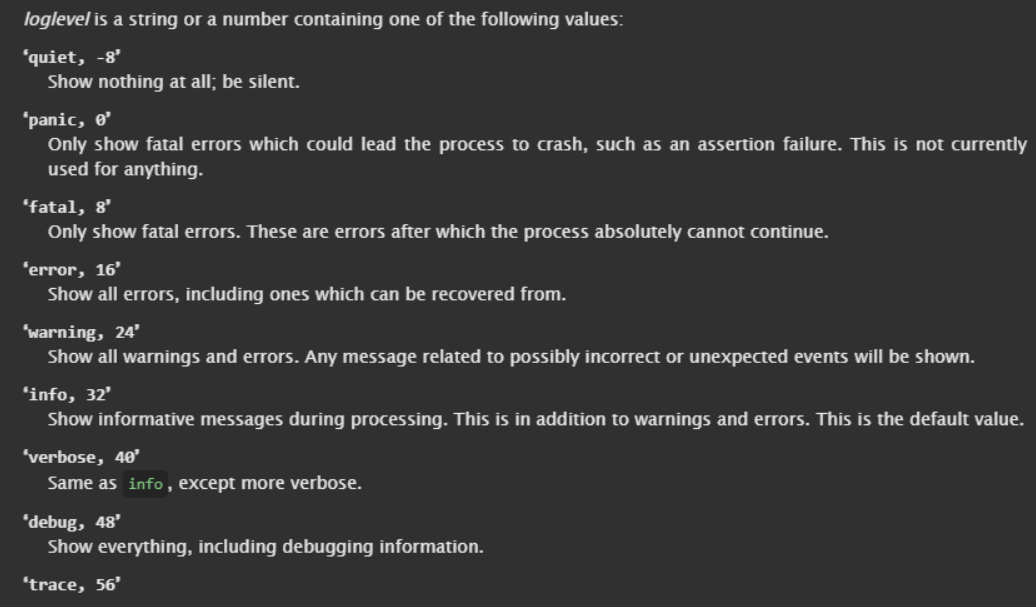
FFmpeg Libraries
-
libavcodec: Provides a generic encoding/decoding framework and contains multiple decoders and encoders for audio, video and subtitle streams, and several bitstream filters. JH-7110 SDK supports the following OMX plug-ins for hard codec/encorder.
Table 2. OMX Plug-ins OMX Plug-in Details Example h264_omx This plug-in supports H.264 video hard decoding through VPU. It does not support hard encoding.
It supports the following options:- omx_pix_fmt: Sets the decoding pixel format for h264_omx decoder. The following formats are supported: yuv420p (default), nv12, nv21.
- scale_width: Sets the scaling width for OMX (Only zoom out is supported, ceil 8 (width/8) and minimum 1/8) (from 0 to INT_MAX) (default: 0)
- scale_height: Set the scaling height for OMX (Only zoom out is supported, ceil 8 (height/8) and minimum 1/8) (from 0 to INT_MAX) (default: 0)
The following code block decodes a 1920×1080 H.264 file output to NV21 1280×720 YUV. ffmpeg -vcodec h264_omx -omx_pix_fmt nv21 -scale_width 1280 -scale_height 720 -i 1080p_30FPS_AVC_420_omx.h264 -frames 100 ff_720p_AVC_i420.yuv -hide_banner -y -v verbosehevc_omx This plug-in supports both H.265 video hard encoding and hard decoding through VPU.
It supports the same options as the h264_omx plug-in.
The following code block decodes a 1920×1080 H.265 file output to NV21 1280×720 YUV. ffmpeg -vcodec hevc_omx -omx_pix_fmt nv21 -scale_width 1280 -scale_height 720 -i 1080p_30FPS_AVC_420_omx.h264 -frames 100 ff_720p_AVC_i420.yuv -hide_banner -y -v verbosemjpeg_omx This plug-in supports JPEG picture and MJPEG video hard decoding through VPU.
In addition to the options supported by the h264_omx/hevc_omx plug-in, it also supports the following options:- mirror: Mirror 0 (none), 1 (V), 2 (H) or 3 (VH), cannot be set at the same time as pixel format conversion, rotation and crop (from 0 to 3) (default: 0)
- rotation: Rotation 0 (0), 1 (90), 2 (180) or 3 (270), cannot be set at the same time as pixel format conversion, mirror and crop (from 0 to 3) (default: 0)
- crop: Crop <x>, <y>, <w>, <h>: crop coord and width/height(from left/top, must be an integer multiple of 16), cannot be set at the same time as pixel format conversion, mirror and rotation.
The following code block decodes a 3840x2160 JPEG picture output to NV21 1920x1080 YUV. ffmpeg -nostdin -nostats -c:v mjpeg_omx -omx_pix_fmt nv21 -scale_width 1 -scale_height 1 -i JPG_3840_2160_420.jpg ff_JPG_1920_2160_i420_scale.yuv -hide_banner -y -v verbose - libavfilter: graph-based frame editing library
- libavformat: Provides a generic framework for multiplexing and demultiplexing (muxing and demuxing) audio, video and subtitle streams. It encompasses multiple muxers and demuxers for multimedia container formats. It also supports several input and output protocols to access a media resource.
- libavdevice: Provides a generic framework for grabbing from and rendering to many common multimedia input/output devices, and supports several input and output devices, including V4L2(Video4Linux2), VfW, DShow, and ALSA.
- libavutil: A utility library to aid portable multimedia programming. It contains safe portable string functions, random number generators, data structures, additional mathematics functions, cryptography and multimedia related functionality (like enumerations for pixel and sample formats). It is not a library for code needed by both libavcodec and libavformat.
- libswresample: Performs highly optimized audio re-sampling, re-matrixing and sample format conversion operations.
- libpostproc: post processing library
- libswscale: Performs highly optimized image scaling and color-space and pixel format conversion operations.