GStreamer
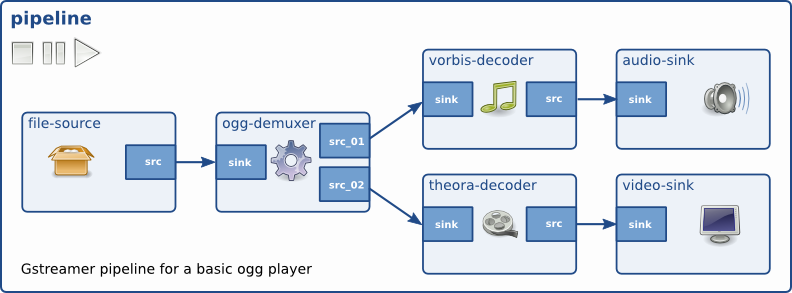
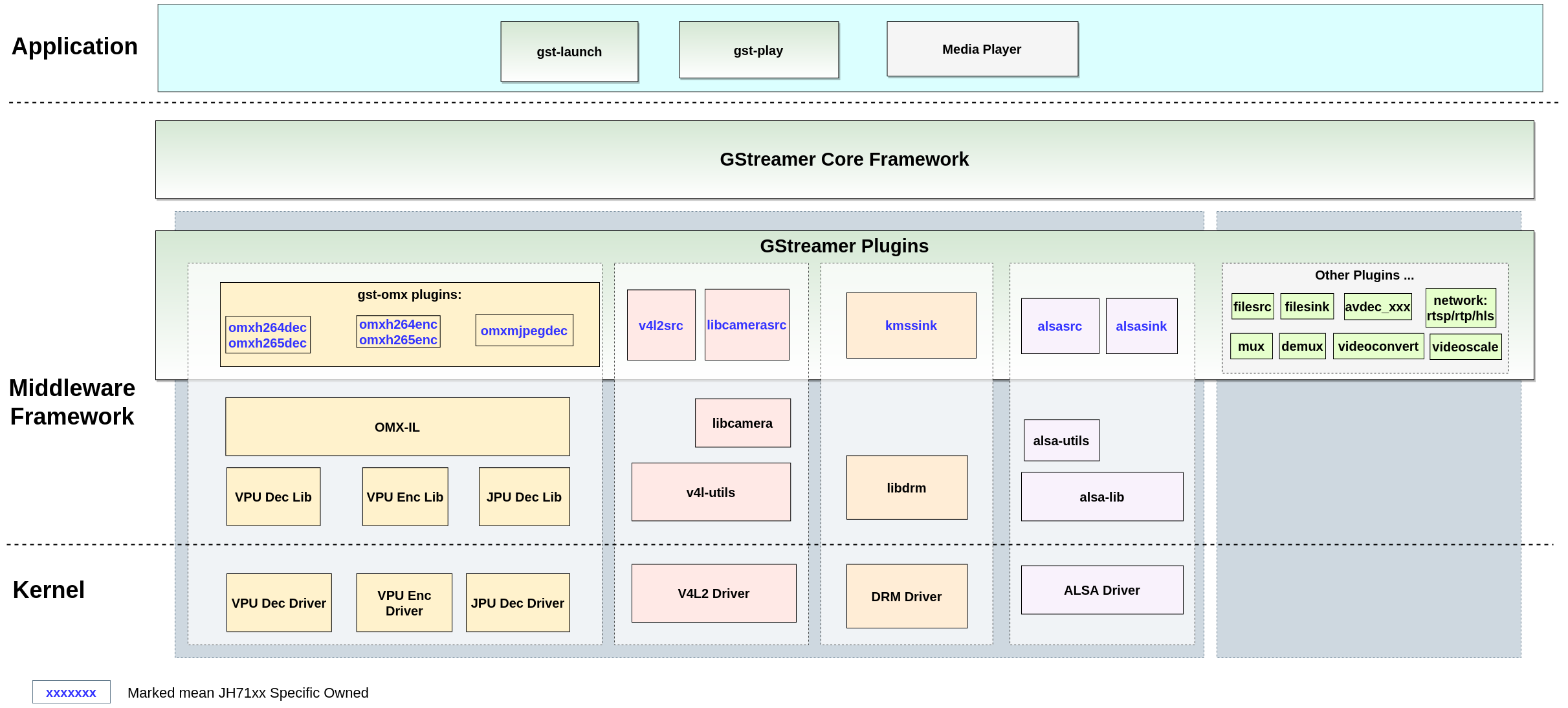
GStreamer is a pipeline-based multimedia framework that links together a wide variety of media processing systems to complete a complex workflow.
GStreamer supports a wide variety of media-handling components, including simple audio playback, audio and video playback, recording, streaming and editing.
Build GStreamer
- Enable the related macros (all enabled by
default).
BR2_PACKAGE_MPP=y
BR2_PACKAGE_MPP_ALLOCATOR_DRM=y
BR2_PACKAGE_GSTREAMER1_ROCKCHIP=y
BR2_PACKAGE_LINUX_RGA=y
BR2_PACKAGE_CA_CERTIFICATES=y
BR2_PACKAGE_LIBSOUP_SSL=y
BR2_PACKAGE_GSTREAMER1=y
BR2_PACKAGE_GST1_PLUGINS_BASE=y
BR2_PACKAGE_GST1_PLUGINS_BASE_PLUGIN_ALSA=y
BR2_PACKAGE_GST1_PLUGINS_BASE_PLUGIN_VIDEOCONVERT=y
BR2_PACKAGE_GST1_PLUGINS_BASE_PLUGIN_VIDEOTESTSRC=y
BR2_PACKAGE_GST1_PLUGINS_GOOD=y
BR2_PACKAGE_GST1_PLUGINS_GOOD_PLUGIN_AUDIOPARSERS=y
BR2_PACKAGE_GST1_PLUGINS_GOOD_PLUGIN_AUTODETECT=y
BR2_PACKAGE_GST1_PLUGINS_GOOD_PLUGIN_DEINTERLACE=y
BR2_PACKAGE_GST1_PLUGINS_GOOD_PLUGIN_FLV=y
BR2_PACKAGE_GST1_PLUGINS_GOOD_PLUGIN_GDKPIXBUF=y
BR2_PACKAGE_GST1_PLUGINS_GOOD_PLUGIN_MATROSKA=y
BR2_PACKAGE_GST1_PLUGINS_GOOD_PLUGIN_MPG123=y
BR2_PACKAGE_GST1_PLUGINS_GOOD_PLUGIN_SOUPHTTPSRC=y
BR2_PACKAGE_GST1_PLUGINS_BAD=y
BR2_PACKAGE_GST1_PLUGINS_BAD_PLUGIN_DVBSUBOVERLAY=y
BR2_PACKAGE_GST1_PLUGINS_BAD_PLUGIN_DVDSPU=y
BR2_PACKAGE_GST1_PLUGINS_BAD_PLUGIN_JPEGFORMAT=y
BR2_PACKAGE_GST1_PLUGINS_BAD_PLUGIN_KMS=y
BR2_PACKAGE_GST1_PLUGINS_BAD_PLUGIN_MPEGDEMUX=y
BR2_PACKAGE_GST1_PLUGINS_BAD_PLUGIN_MPEG2ENC=y
BR2_PACKAGE_GST1_PLUGINS_BAD_PLUGIN_VIDEOPARSERS=y
BR2_PACKAGE_GST1_PLUGINS_BAD_PLUGIN_ADPCMDEC=y
BR2_PACKAGE_GST1_PLUGINS_BAD_PLUGIN_ADPCMENC=y
BR2_PACKAGE_GST1_PLUGINS_BAD_PLUGIN_FAAD=y
BR2_PACKAGE_GST1_PLUGINS_UGLY=y
BR2_PACKAGE_GST1_PLUGINS_UGLY_PLUGIN_ASFDEMUX=y
BR2_PACKAGE_GST1_PLUGINS_UGLY_PLUGIN_DVDLPCMDEC=y
BR2_PACKAGE_GST1_PLUGINS_UGLY_PLUGIN_DVDSUB=y
BR2_PACKAGE_GST1_PLUGINS_UGLY_PLUGIN_MPEG2DEC=y
...
The complete list of plug-ins can be found in menuconfig > Target packages > Audio and video applications > gstreamer 1.x. .
-
Build them in the SDK root directory directly with the following command.
$ make
To build GStreamer for Debian:
- Use the following command to update software
resources.
apt update
- Use the following command to install library
dependencies.
apt build-dep
- (Optional) Use the following command to start build the Debian installation
package.
dpkg-buildpackage -b -d -uc -us
Result: After the building is completed, the Debian installation package will be generated in the upper directory, which can be installed by using
dpkg -i xxx.deb. - Build and
install.
meson build && ninja -C build install
GStreamer Commands
The following table describes the commands generally used for GStreamer.
| Command | Description | Example |
|---|---|---|
| gst-launch-1.0 | This command works as the GStreamer launcher for building pipelines quickly. | The following code block shows an example of generating a
video by videotestsrc, and play it through
xvimagesink. |
| gst-inspect-1.0 | This command works as the GStreamer inspector for listing all the plug-in information in details. | The following code block shows an example of listing all
plug-ins
details.gst-inspect-1.0 --version |
| gst-play-1.0 | This command works as the GStreamer player for playing various streaming media files. | The following code block shows an example of playing a test
video file through the xvimagesink
plug-in. |
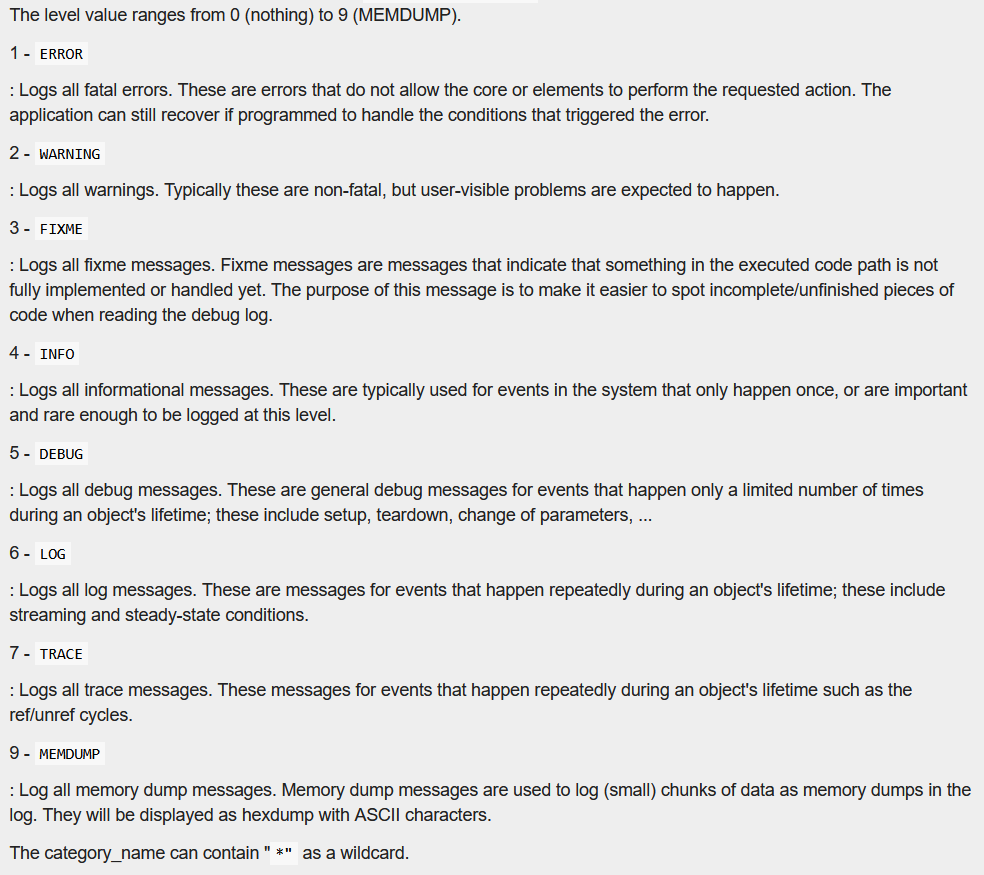
GST_DEBUG. For example:- The following setting globally sets the log level to 2
(warning):
export GST_DEBUG=2 - The following settings set the log level of fpsdisplaysink to 5
(debug), xvimage* to 3 (FIXME), and all others to 2
(debug):
GST_DEBUG=2,fpsdisplaysink:5,xvimage*:3
Common GStreamer Plug-ins
The following table describes some common GStreamer plug-ins.
| Plug-in | Description | Example |
|---|---|---|
| filesrc | Reads from arbitrary point in a file | The following command reads data from the /tmp/test file and
creates a new file /tmp/test2 by
copy. |
| videotestsrc | Creates a test video stream | The following command generates a video output in a specified
format (NV12) with specified width and
height. |
| filesink | Saves the received data as a file. | The following command reads data from the /tmp/test file and
creates a new file /tmp/test2 by
copy. |
| fakesink | Black hole for data. Used to discard all the received data. | The following command discards the /tmp/test
file. |
| xvimagesink | Used as the video sink to receive video and display, which is implemented by the X11 interface. |
|
| kmssink | Used as the video sink to receive video and display. The plug-in is implemented through the KMS interface and requires an exclusive hardware decoding layer. |
|
| waylandsink | Used as the video sink to receive video and display. The plug-in is implemented through the wayland interface and requires an exclusive hardware decoding layer. |
|
| fpsdisplaysink | Shows the current frame-rate and drop-rate of the videosink as overlay or text on stdout |
|