GStreamer Use Examples
This topic provides some FFmpeg command use examples.
Capture Video
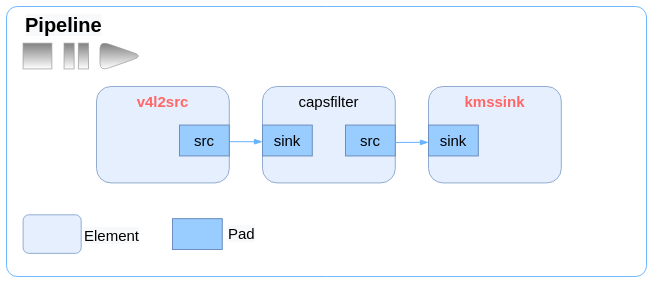
The following code block provides an example of capturing video content from
camera/sensor and display over HDMI.
gst-launch-1.0 v4l2src device=/dev/video1 ! video/x-raw,format=NV12,width=1920,height=1080 ! kmssink driver-name=starfive force-modesetting=1
The following diagram shows the video capturing workflow.Figure 1. GStreamer Video Capturing Workflow
Playback MP4
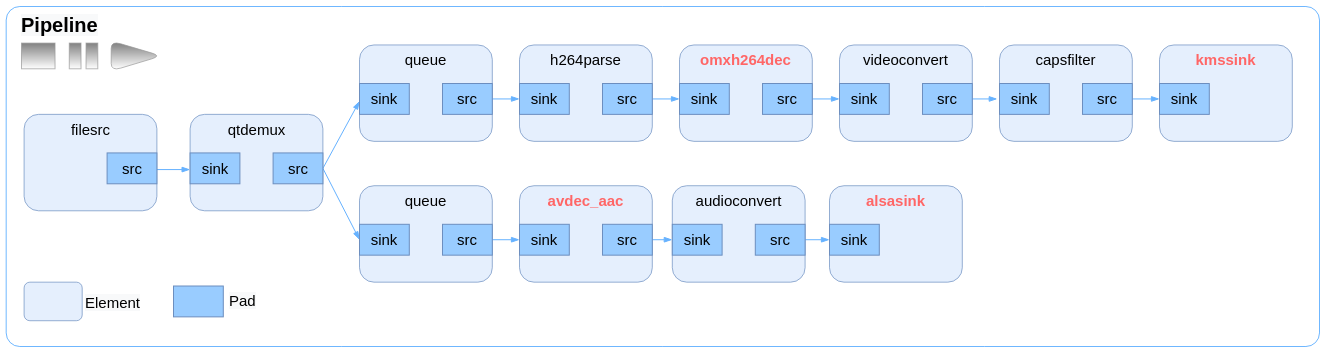
The following code block provides an example of playing back an MP4 video file, in
this case, the H.264 video stream is decoded via the gst-omx
plug-in.
gst-launch-1.0 -v filesrc location=1080p_h264_aac.mp4 ! qtdemux name=demux demux.audio_0 ! queue ! avdec_aac ! audioconvert ! alsasink device=hw:0,2 demux.video_0 ! queue ! h264parse ! omxh264dec ! video convert ! video/x-raw,width=1920,height=1080 ! kmssink driver-name=starfive force-modesetting=1
The following diagram shows the MP4 playback workflow.Figure 2. GStreamer MP4 Playback Workflow
Record Video
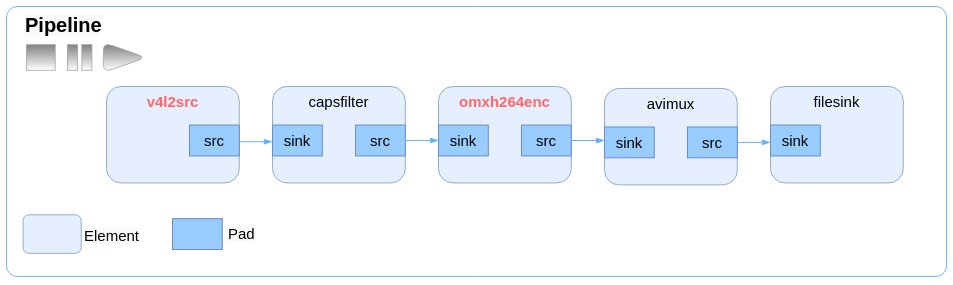
The following code block provides an example of encoding video stream content from
camera/sensor into H.264 and encapsulating it to AVI format.
gst-launch-1.0 v4l2src device=/dev/video1 ! video/x-raw,width=640,height=480,format=NV12 ! omxh264enc ! avimux ! filesink location=11.avi
The following diagram shows the video recording workflow.Figure 3. GStreamer Video Recording Workflow
Create Pipelines Automatically
The following code blocks provide some examples of creating pipelines automatically
by using the decodebin or uridecodebin plug-in.
- The following code block provides an example of using the 3 plug-ins
filesrc, decodebin, and kmssink
together.
gst-launch-1.0 filesrc location=4K_h265_hevc_30FPS.mkv ! decodebin ! kmssink driver-name=starfive force-modesetting=1 - The following code block provides an example of using the 2 plug-ins
uridecodebin and kmssink together. The location of the
media file is recorded as value of the URI property of
uridecodebin.
gst-launch-1.0 uridecodebin uri=file:///media/root/4K_h265_hevc_30FPS.mkv ! kmssink driver-name=starfive force-modesetting=1 - The following code block provides an example of using the 2 plug-ins
uridecodebin and kmssink together. The location of the
media file is recorded as value of the URI property of uridecodebin
and output is forced to the MIPI
device.
gst-launch-1.0 uridecodebin uri=file:///media/root/640_360_h265_aac.mkv ! kmssink driver-name=starfive force-modesetting=1 plane-id=74 connector-id=118 -
The following code block provides an example of using the plug-in uridecodebin to decode a media file, but only play audio from the decoded file.
gst-launch-1.0 uridecodebin uri=file:///media/root/640_360_h265_aac.mkv ! audioconvert ! alsasink device=hw:0,1
Play Camera Recordings in Debian
Follow the steps below to enable the screen to play real-time camera recordings in
the Debian operating system.
-
Install the v4l2-ctl tool to detect the recordings and list the resolutions supported by the current camera.
-
Select one of the resolutions for display. The following code blocks provide some examples.
- Set the resolution to
800×600:
gst-launch-1.0 v4l2src device=/dev/video4 ! video/x-raw,width=800,height=600 ! videoconvert ! xvimagesink - Set the resolution to
1280×720:
gst-launch-1.0 v4l2src device=/dev/video4 ! video/x-raw,width=1280,height=720 ! videoconvert ! xvimagesink - Set the resolution to
1280×900:
gst-launch-1.0 v4l2src device=/dev/video4 ! video/x-raw,width=1280,height=960 ! videoconvert ! xvimagesink
- Set the resolution to
800×600:
Disable Audio Output
The following code block provides an example of playing a video with audio output
disabled.
gst-play-1.0 -v 1080p_h264_aac.mp4 --audiosink=fakesink --videosink='kmssink driver-name=starfive force-modesetting=1'
Specify Audio Output Device
The following commands play the same video with different audio output devices, with
one command routing audio to device hw:0,1 while the other routing
audio to device hw:0,2.
gst-play-1.0 1080p_h264_aac.mp4 --audiosink='alsasink device=hw:0,1' --videosink='kmssink driver-name=starfive force-modesetting=1'gst-play-1.0 1080p_h264_aac.mp4 --audiosink='alsasink device=hw:0,2' --videosink='kmssink driver-name=starfive force-modesetting=1'