OpenMAX IL Programming
This topic describes how to develop a custom IL client application that directly uses the OpenMAX IL API to control codec components.
Determine Role Support
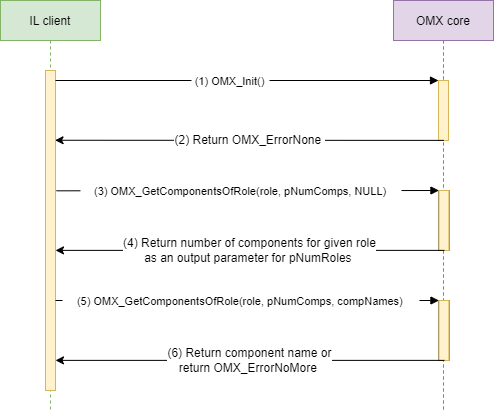
Before loading a component, the IL client must verify that the OMX core supports the
required role. Call OMX_GetRolesOfComponent to enumerate the roles
supported by a given component name. If no component supports the given role, the
output parameter for OMX_GetRolesOfComponent is 0.
Load Component
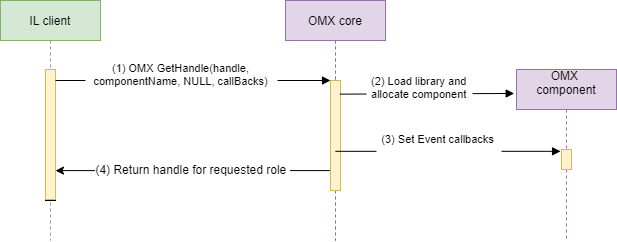
After confirming role support, the IL client loads the component by calling
OMX_GetHandle. This call dynamically loads the component
library and initializes the component into the Loaded state. The client also
registers callback functions — FillBufferDone,
EmptyBufferDone, and EventHandler — to receive
asynchronous notifications from the component.
Component Handshake
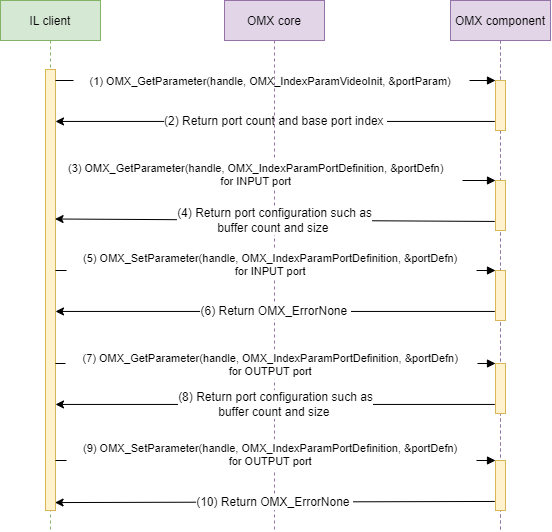
After acquiring the component handle, the IL client must initialize and configure the component by retrieving and setting port definitions.
-
Call
OMX_GetParameterwithOMX_IndexVideoInitto retrieve the number of ports supported by the component and the base port index. -
The component returns the port count and base index.
-
For each port, call
OMX_GetParameterto retrieve port configuration, including preferred buffer size and number of buffers. -
Call
OMX_SetParameterto configure each port with the desired settings (either the retrieved defaults or custom values).
Configure Decoder Parameters
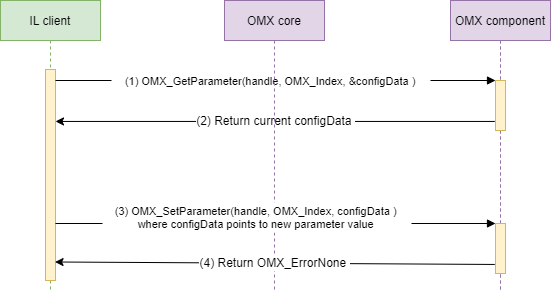
The OMX IL component accepts codec-specific parameters beyond the mandatory port configuration, such as input frame dimensions, target frame rate, and target bit rate.
-
Call
OMX_GetParameterto retrieve the current parameter configuration. -
Call
OMX_SetParameterwith the appropriateOMX_Indexto set custom parameters. This must be done before sending any input data viaOMX_EmptyThisBuffer.
Color Format Configuration
-
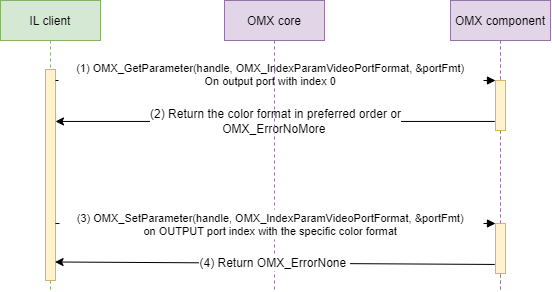
Query the component for supported color formats in a loop until the component returns
OMX_ErrorNoMore. -
Index 0 is reserved for
YUV420PackedSemiPlanar(NV12) — this is the default color format used to configure the component.
Allocate Buffer
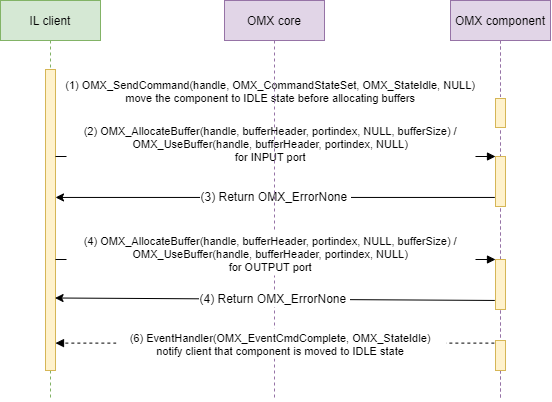
After the component is configured, the IL client allocates buffers to transition the component from the Loaded state to the Idle state. Hardware components use physical memory for output buffers to interface with the VPU, so the client uses the AllocateBuffer model for the output port.
-
Initiate the Loaded-to-Idle state transition.
-
On the input port, call
OMX_UseBufferorOMX_AllocateBufferfor each input buffer in a loop. -
On the output port, call
OMX_UseBufferorOMX_AllocateBufferfor each output buffer in a loop. -
After all buffers are successfully allocated on both ports, the component generates the
OMX_EventCmdCompleteevent for the Loaded-to-Idle transition, delivered viaEventHandlerCallback.
Configure Dynamic Port
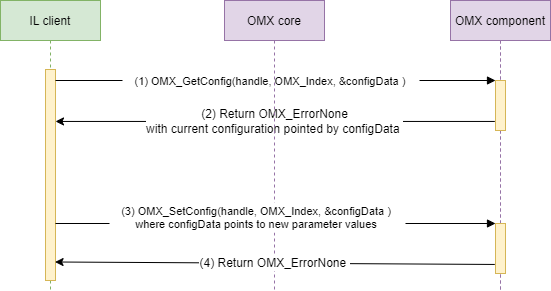
After buffer allocation, the IL client may need to reconfigure ports dynamically — for example, when the decoder detects a resolution change in the bitstream. The dynamic port configuration workflow allows the client to disable, reconfigure, and re-enable ports at runtime.
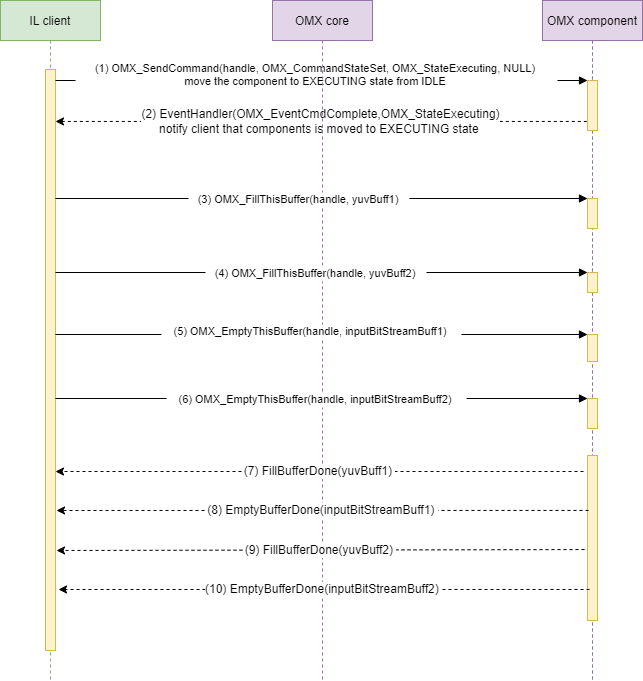
Process Data
-
Transition the component from Idle to Executing.
-
Wait for
OMX_EventCmdCompleteconfirming the state transition. -
Call
OMX_FillThisBufferwith output buffers to hold the decoded YUV data. -
Call
OMX_EmptyThisBufferwith input bitstream data to be decoded. -
The component generates
EmptyBufferDonecallbacks (input buffer consumed) andFillBufferDonecallbacks (output buffer filled) to notify the client.
De-initialize
-
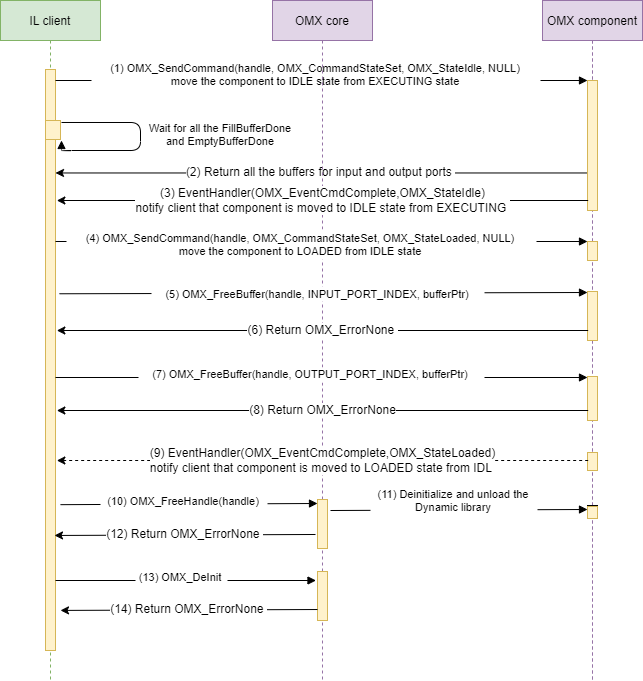
Transition the component from Executing to Idle.
-
Wait for all buffers to be returned by the component via
EmptyBufferDoneandFillBufferDonecallbacks. -
The component generates
OMX_EventCmdCompletefor the Executing-to-Idle transition. -
Transition the component from Idle to Loaded.
-
Free all input and output buffers using
OMX_FreeBuffer. -
Wait for
OMX_EventCmdCompletefor the Idle-to-Loaded transition. -
Call
OMX_FreeHandleto release the component handle. -
Call
OMX_DeInitto de-initialize the OMX core.